
Yes, you can display chords with lyrics right now using inline ChordPro-style text, a browser or app chart editor, a PDF on a tablet, or a presentation tool with autoscroll. The method that fits best depends on whether you're rehearsing alone at your kitchen table or leading a full worship team on a Sunday morning. Whichever you choose, check that it supports transpose and presentation mode. Those two features are what separate a workable chart from one that actually holds up under stage lights.
TL;DR:
- Using shared, synced platforms like Song7 streamlines rehearsal and live performance by ensuring all team members access the same up-to-date charts.
- Transposing is most effective with tools that automatically shift all chords uniformly, but permanent key changes require regenerating a clean chart to avoid misalignments.
- Proper formatting, including font size, contrast, and clear section labels, significantly enhances chart readability during stage performances.
- Correct placement of chord brackets on exact syllables, combined with verifying on the actual device, prevents chords from landing on wrong words or phrases.
- Pasted lyrics should be cleaned of hidden formatting and line breaks to maintain consistent alignment across different devices and export formats.
Table of Contents
- Which Method Is Best for Displaying Chords with Lyrics?
- How Do You Format Chords with Lyrics Using ChordPro Syntax?
- What's the Best Way to Show Chords and Lyrics Onstage?
- How Do You Transpose Charts Without Losing Alignment?
- What Formatting Keeps Chord Charts Readable Onstage?
- How Do You Display Complex Chords and Harmonies Clearly?
- How Do You Keep Chord Changes Synced with the Right Lyric?
- What Causes Alignment and Font Problems in Chord Charts?
- Why Team-Based Song Management Saves Real Rehearsal Time
- Song7 Puts Your Chord Charts, Setlists, and Presentation Mode in One Place
- Sources
- FAQ
Which Method Is Best for Displaying Chords with Lyrics?
Every option below solves the same problem in a different way, and picking the wrong one for the moment is how you end up fumbling a lyric sheet mid song. Here's how the main approaches stack up.
- ChordPro or inline bracketed text — best for portability and editing. You type chords in brackets right next to the lyric, and the file stays lightweight enough to email, paste into a text app, or drop into a chart editor. Great for solo practice and quick edits during rehearsal.
- Browser or app chart editors — best for speed and visual polish. Tools like Guitar Scribble's chord chart maker let you paste bracketed input and instantly see chords rendered above lyrics, often with chord diagrams included.
- PDF on a tablet — best for big-screen stands and printed backups. Once a chart is finalized, exporting to PDF gives you a fixed layout that won't shift or reflow unexpectedly on stage.
- Presentation or autoscroll tools — best for hands-free live performance, especially when you're singing lead and can't flip pages.
For individual practice, inline text or a quick browser editor gets you moving fastest. For a worship team with five people reading off five different devices, a shared, synced format matters more than which app renders it.
How Do You Format Chords with Lyrics Using ChordPro Syntax?
ChordPro is the closest thing this space has to an industry standard, and most modern chart tools, including the parsing logic behind widgets like chordify_lyrics, are built around its bracket convention. The idea is simple: you place the chord in square brackets directly before the syllable where it changes. A single line looks like this:
[G]Amazing [C]grace, how [G]sweet the [D]sound
That bracket sits immediately before the letter where the chord change happens, which is what lets software (and your own eyes) know exactly when to strum.
- Add section headers. Most formats recognize simple markers like
# Verse 1,# Chorus, or# Bridgeto break the song into readable chunks instead of one long wall of text. - Use directives for title, key, and capo. A line like
{title: Amazing Grace}or{capo: 3}tells the renderer how to label and display the chart without you retyping that information every time. - Convert pasted lyrics from tab sites. If you're pulling a chord sheet from a library like Ultimate Guitar, paste the text in, fix any broken line breaks, place your brackets at the correct syllables, then export or print.
- Check placement before transposing. Automatic transpose tools shift every bracketed chord by the same interval, so if a chord is misplaced by one syllable before you transpose, it stays misplaced in every key after.
Pro Tip: Type your brackets while listening to a slowed-down recording of the song. It's the fastest way to catch a chord that's landing on the wrong word before it becomes a habit you have to unlearn later.
For a deeper walkthrough of directives and syntax quirks, Song7's guide to the ChordPro format covers the pieces most beginners skip.
What's the Best Way to Show Chords and Lyrics Onstage?
Stage display is a different problem than practice display. You're not editing anymore. You're trying to read fast, accurately, and without touching anything if your hands are full.
- Autoscroll settings. Some presentation tools let you set a fixed scroll speed, while others link scroll rate to a set tempo. Test the actual speed against a full run-through of the song before the gig, not just a glance at the settings screen. A tempo that felt right at rehearsal can feel too fast under adrenaline.
- Projection and screen layout. Keep chord text noticeably smaller or differently colored than lyric text, and leave real margin space on all sides so nothing gets clipped by a projector's edge blanking.
- Tablet and music-stand placement. Angle the tablet to avoid glare from stage lighting, and if your hands are occupied by an instrument, a Bluetooth foot pedal or remote for page turns saves you from having to reach mid song.
- Multi-device syncing. When several band members read from separate devices, the safest setup keeps everyone on the same synced file rather than relying on each person's own saved copy, which drifts out of date the moment one person makes an edit.
Inline chord diagrams and built-in autoscroll are becoming standard features across performance-focused apps, similar to what's described in ChordPrompter's approach to showing chords directly inside the lyric line.
Pro Tip: Always have a fallback. Print one paper copy of the set, or save a PDF locally on the device, in case your Wi-Fi or sync connection drops thirty seconds before you go live.
How Do You Transpose Charts Without Losing Alignment?
Automatic transpose is fine for a quick key change during rehearsal, but for a permanent shift you plan to use every week, regenerating a clean chart avoids the small alignment drift that can creep in after repeated transposition.
- Use automatic transpose for on-the-fly changes. If your singer needs the song a step lower for one Sunday, an app's transpose button handles it instantly without touching the original file.
- Regenerate the source file for permanent key changes. This keeps the chart clean for the next several months instead of stacking transpositions on top of each other.
- Annotate the capo clearly. Note the capo position at the top of the chart (
{capo: 2}in ChordPro) so the chord shapes shown match what the guitarist actually plays, not just the sounding key. - Consider Nashville numbers or Roman numerals for flexible bands. If your team changes key from week to week depending on the vocalist, number-based notation lets musicians follow the progression without a full rewrite every time.
- Run a rehearsal check. Confirm every device shows the same key and the same chart version before doors open, not after the first song starts.
Song7's guide on how to transpose chord charts walks through the checks worth running before you commit to a new key for good.
What Formatting Keeps Chord Charts Readable Onstage?
Readability under stage conditions comes down to a handful of concrete choices, not general good taste.
- Font size. For a music stand a few feet away, 14 to 18 point text is usually the minimum for a quick glance. Projected lyrics for a room need to be sized against your farthest seat, not your front row.
- Contrast between chords and lyrics. Bold or colored chord text set apart from lyric text prevents your eye from confusing the two under dim stage lighting.
- Section labels and roadmaps. A visible
ChorusorBridgetag helps a musician recover quickly if they lose their place, and a roadmap at the top of the chart avoids unnecessary page turns. - Export checks. Before a performance, open the exported PDF on the actual device you'll use and confirm nothing reflowed differently than it looked in the editor.
Correct placement, where the chord bracket sits right before its target syllable and line breaks stay intentional, is what most chord chart generator conventions point to as the real driver of onstage readability. Song7's own post on how to format chord charts to avoid mid-phrase page turns covers a few layout habits worth stealing.
How Do You Display Complex Chords and Harmonies Clearly?
Extended and altered chords, think Cmaj7, F#dim7, or Bsus4/A, take up more visual space than a simple triad, and cramming them into the same tight bracket spacing you use for basic chords makes a chart harder to read fast. The fix isn't to shrink the font. It's to give complex voicings a little breathing room in the line itself, even if that means slightly uneven spacing between words.
Slash chords (like D/F#) are worth writing exactly as you'd say them, bass note included, rather than simplifying to the base chord and hoping the bass player figures it out by ear. If a song leans on a specific harmony structure, like a repeated ii-V-I jazz turnaround or a modal drone under the verse, a short annotation above the section (# Verse - stay on Dsus2) saves confusion better than trying to notate every voicing change individually.
For vocal harmonies layered under the melody, most chord-over-lyric formats don't have a clean built-in way to show a second vocal line, so a bracketed note like (harmony: 3rd above) at the start of a section tends to work better than trying to force a second staff of chords into the same line. Keep harmony instructions separate from the chord line itself. Mixing the two makes both harder to read at a glance, and a musician scanning quickly needs one clear line to follow, not two competing systems fighting for the same visual space.
How Do You Keep Chord Changes Synced with the Right Lyric?
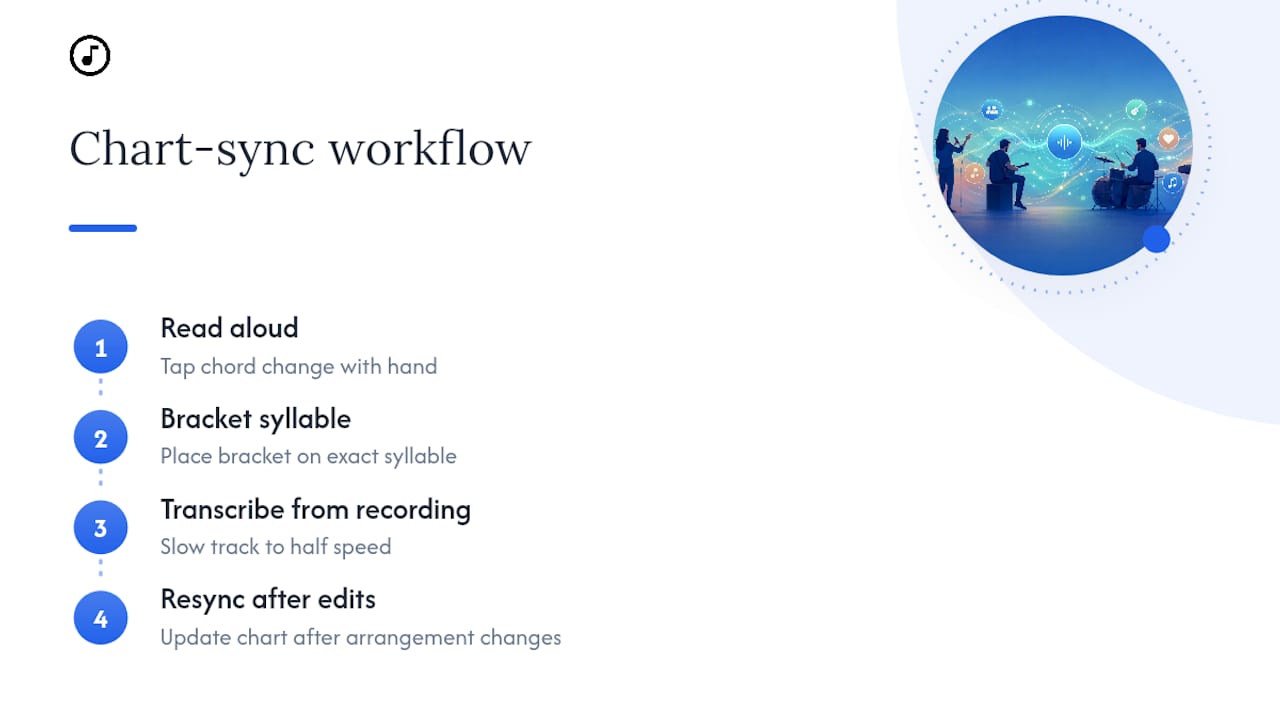
The single biggest cause of a chord landing on the wrong word isn't bad ears, it's bad proofreading. Read the chart out loud, tapping the chord change with your hand as you go, before you ever play it on an instrument. Your speaking rhythm will expose a misplaced bracket faster than playing through it will, because your ear expects the chord to land exactly where the emphasis falls in the phrase.
For songs with syncopated rhythms or chord changes that happen mid-word rather than at the start of a line, place the bracket at the exact syllable, not the nearest word boundary. Amaz[G]ing grace is more accurate than [G]Amazing grace if that's genuinely where the strum lands. It looks slightly odd on the page, but it's correct, and correct beats tidy every time you're actually performing.
If you're converting a chart from a recording rather than an existing chord sheet, slow the track down to half speed while you place brackets. Chord changes that sound instant at full speed often reveal a passing chord or a quick walk up you'd otherwise miss, and catching those in the format phase means one clean pass instead of three revisions after a band member points out the missing chord on stage.
Last, resync your chart any time a bandleader changes an arrangement. A chart that was accurate for the recorded version can drift out of sync the moment your team decides to cut a verse or add an extra chorus.
What Causes Alignment and Font Problems in Chord Charts?
Most display problems trace back to one of three causes: inconsistent line breaks, mismatched font rendering between devices, or leftover formatting from a pasted source.
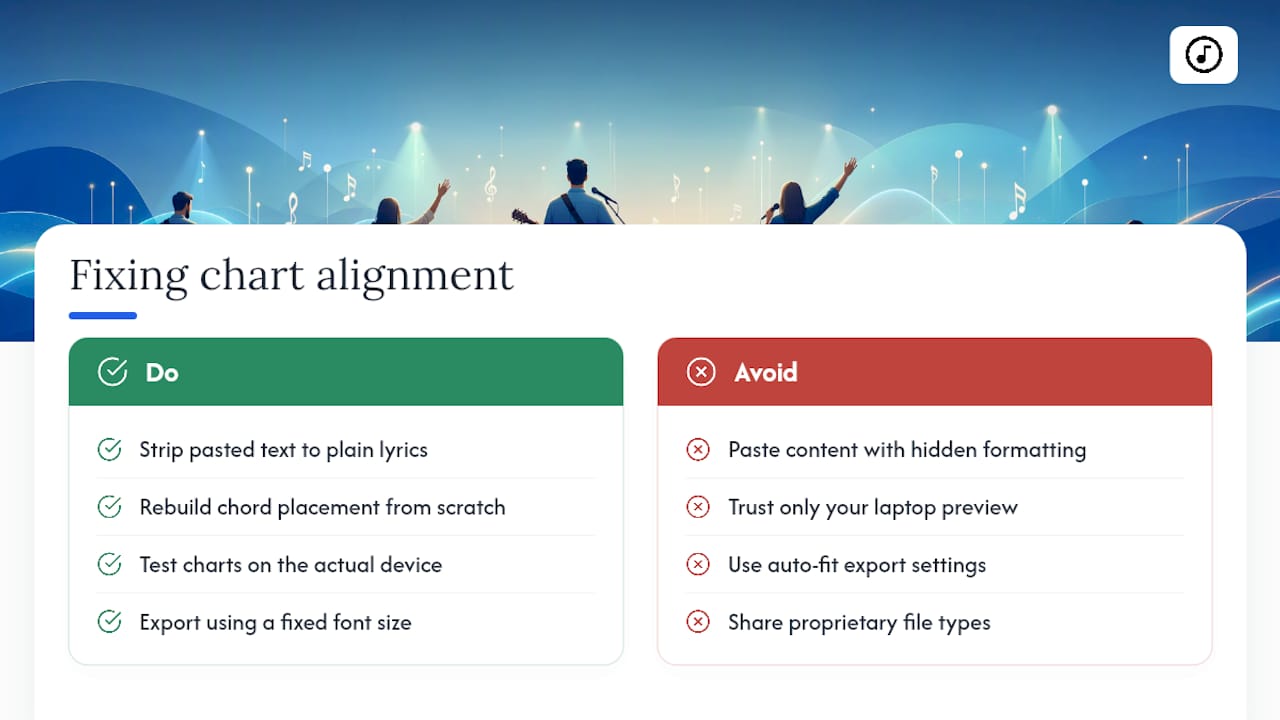
Alignment issues almost always start with pasted text. Content copied from a chord library or a PDF often carries hidden line breaks or extra spaces that look fine on your screen but throw off spacing once you paste it into an editor. Before placing a single bracket, strip the pasted text down to plain lyrics, then rebuild the chord placement from scratch rather than trying to fix broken spacing after the fact.
Font size problems usually show up when a chart looks perfect on your laptop and then renders too small, or oddly wrapped, on a phone or tablet screen. Test every chart on the actual device it'll be used on, not just the one you built it on. A 16 point font that fits cleanly on a widescreen laptop can wrap awkwardly on a narrower tablet screen and push lyrics onto extra lines you didn't plan for.
If chords appear to float in the wrong spot after export, check whether the export process re-flowed the text. Some PDF exporters recalculate line breaks based on page width, which shifts where a chord lands relative to its syllable even if the source file was correct. When that happens, exporting at a fixed font size rather than an auto-fit setting usually solves it. And if a chart looks fine solo but breaks when shared with a bandmate, the file format itself, not the content, is often the culprit; a plain ChordPro export tends to travel more reliably between apps than a proprietary file type.
Why Team-Based Song Management Saves Real Rehearsal Time
Centralized setlists change how a volunteer team actually rehearses. When one person updates a chart and everyone's device reflects that change instantly, you cut out the version confusion that happens when three people show up with three slightly different PDFs of the same song.
Presentation mode, built-in transposition, and simple import options matter more for volunteer teams than for solo players, because volunteers rarely have time to reformat a chart between Tuesday practice and Sunday morning. The real signal that it's time to move past ad-hoc paper charts and email threads is when you're spending more time reconciling versions than actually rehearsing the music.
— Editorial team
Song7 Puts Your Chord Charts, Setlists, and Presentation Mode in One Place
Song7 replaces the folder of printed charts and the group text thread of last-minute PDF edits with one synced space your whole team can trust on a Sunday morning. It's built specifically for volunteer worship teams, so presentation mode, real-time sync, instant transpose, and ChordPro import all work together instead of living in three separate apps.

Getting started typically involves signing up, importing or pasting in a chart, arranging it into a setlist, and opening presentation mode to preview how it'll look on stage. If your team is still juggling printed charts and scattered PDFs, organizing your church song library inside one shared system is the fastest way to stop the version confusion for good. Explore the setlist builder and worship tools to see how it fits your team's rehearsal week.
Sources
- chordify_lyrics — Flutter package
- Guitar Scribble — Chord chart maker
- Chord chart generator — Jasper Bernaers
FAQ
What Is the Standard Format for Displaying Chords with Lyrics?
ChordPro, which places chords in brackets directly before the syllable where they change, is the closest thing to an industry standard and is supported by most chart makers and parsing tools like chordify_lyrics.
Can I Automatically Transpose a Chord Chart to a New Key?
Yes, most chart editors and apps include a transpose function that shifts every bracketed chord by the same interval instantly, though a permanent key change is usually cleaner as a regenerated file rather than a repeated on-the-fly transpose.
What's the Best Setup for Displaying Lyrics and Chords Live?
A tablet or projection screen running presentation mode with autoscroll, paired with a Bluetooth foot pedal for hands-free page turns, is the most reliable setup for live performance without manual scrolling.
How Do I Fix Chords That Don't Line Up with the Right Word?
Strip pasted text down to plain lyrics first, then rebuild chord placement from scratch, placing each bracket at the exact syllable where the change happens rather than the nearest word boundary.
Is There a Tool That Syncs Chord Charts for a Whole Worship Team?
Song7 centralizes chord charts and setlists with real-time syncing, so every team member's device reflects the same updated chart instantly instead of relying on emailed PDFs.