
Set lyric advance timing to match the vocalist's audible entrance, not the drum hit, the click track, or a guess from memory. If every cue in a song is off by a consistent amount, fix it with one global offset. If the gap between lyrics and voice grows as the song plays, offset won't help. You need to nudge lines against the waveform instead. Run a quick preview with your lead vocalist before service using a three-stage sync: rough, readability, then preview.
TL;DR:
- Applying a single global offset fixes timing errors when lyrics are consistently early or late across the whole song, but not when drift increases over time.
- Using waveform nudging allows precise adjustment of individual lines or words that are misaligned, especially when offset alone cannot correct growing timing gaps.
- Conducting a four-point check—at the song's start, middle, bridge, and final chorus—quickly reveals whether drift is uniform or progressive, guiding proper correction.
- Re-timing against the live band recording, rather than the original studio track, is essential to prevent drift caused by tempo changes or arrangement differences.
- Running a full-speed preview with the vocalist before service helps catch early or late highlight issues, reducing last-minute surprises during the actual performance.
Table of Contents
- Lyric Advance Timing Checklist For Tech Rehearsal
- Line Timing Vs. Word Timing: Which Format Do You Need?
- Why Do My Lyrics Drift Out Of Sync Mid-Song?
- The Three-Stage Workflow Your Team Can Run In 30 Minutes
- How Song7 Handles Lyric Timing In Practice
- A Volunteer Media Lead's Take On Getting This Right
- Try The Workflow Inside the Platform
- Sources
- FAQ
Lyric Advance Timing Checklist For Tech Rehearsal
You don't need an hour to get this right. Most timing problems get caught and fixed in the last ten minutes before doors open, if you know where to look.
Here's the sequence we'd recommend running every time, in order:
- Test four points in the song: the opening line, a mid-verse line, the bridge, and the final chorus. This catches drift that a single spot check would miss.
- Apply a global offset if the gap is consistent everywhere. A positive offset moves cues earlier; a negative offset moves them later. If lines are running late by the same amount at all four checkpoints, one offset adjustment fixes the whole song.
- Switch to waveform nudging when offset isn't enough. If offset only fixes part of the song, you're dealing with individual lines or words that need to be dragged into place one at a time.
- Break up dense lines. A line with ten words crammed into two seconds is unreadable from the back pew. Split it, or extend its display window.
- Snap word-level highlights to the actual vocal onset, not the underlying beat, and never let two words highlight at once.
- Run a full-speed preview with your vocalist before the service starts, watching the screen the way the congregation will.
Pro Tip: Do your four-point drift check with the actual mix the band will use that day, not last week's rehearsal recording. A last-minute key change or a slower bridge will throw off timing that looked perfect on Thursday.
Skipping the preview step is the single most common shortcut that comes back to bite a media team mid-service.
Line Timing Vs. Word Timing: Which Format Do You Need?
Two formats dominate lyric timing, and most volunteer teams only need one of them. Standard LRC files use a single timestamp per line, showing the whole line at once when the singer reaches it. Enhanced LRC goes further, placing a timestamp on every individual word, which is what powers karaoke-style highlighting where each word lights up as it's sung.
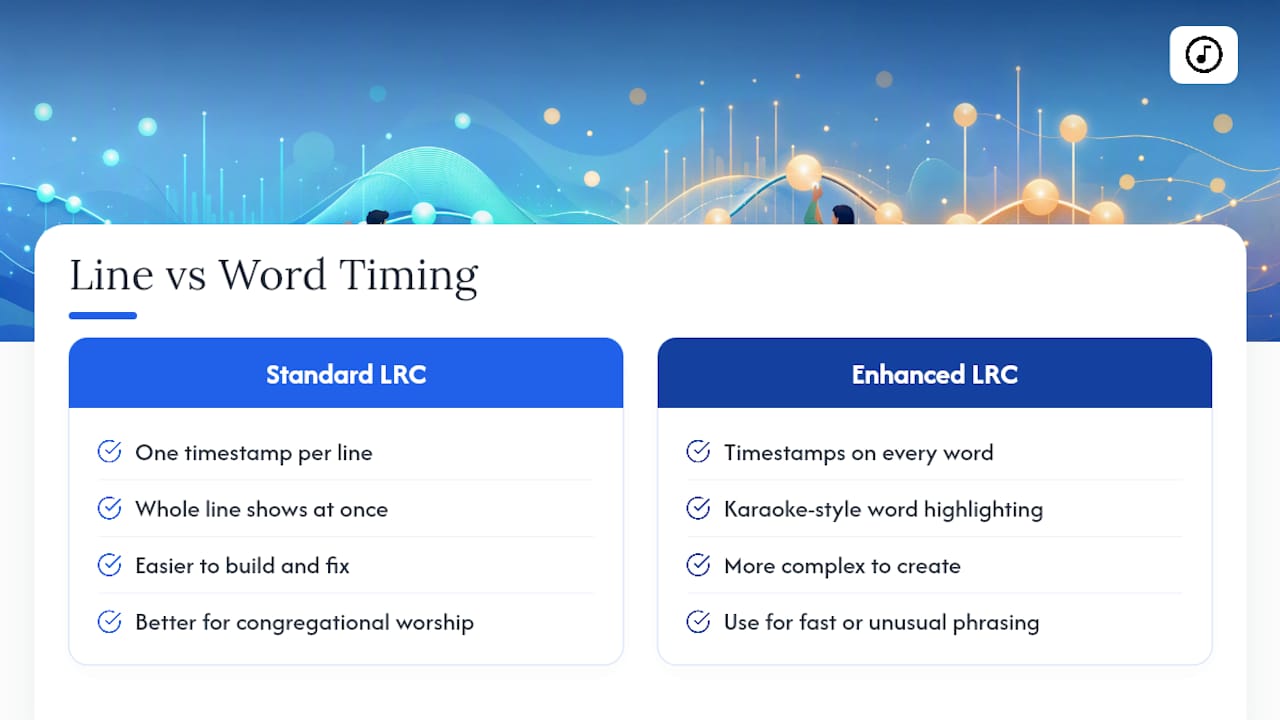
For congregational worship, line-level timing is usually the better default. It's easier to build, easier to fix, and far more forgiving when your vocalist phrases a line slightly differently than rehearsal. Word-level timing earns its complexity for songs where the congregation genuinely benefits from a moving highlight, like a fast rap-influenced bridge or a song with unusual phrasing where people lose their place easily.
A global offset works by shifting every timestamp in the file by the same amount, forward or backward. It's the fastest fix available, but it only works when the error is uniform. The moment the gap between lyric and voice grows or shrinks as the song progresses, you're looking at drift, not offset, and no single number will fix it.
AI auto-sync tools have gotten genuinely useful for a first pass, aligning most of a song's lyrics to audio in seconds. But automated alignment still struggles with sustained notes, ad-libs, and background instrumentation that confuses onset detection, so manual review and nudging remain necessary before anything goes live. Some sync engines can hit accuracy under 10 milliseconds using onset detection. That level of precision matters far less for a congregation than simply matching the singer's actual entrance. Your target isn't a stopwatch number. It's whether the highlight lands the instant the voice does.
Why Do My Lyrics Drift Out Of Sync Mid-Song?
Drift is the most frustrating timing problem because it looks fine at first and then quietly falls apart. You check the opening line, it's perfect, and by the second verse the highlight is trailing half a second behind. That's not a bad guess. It's usually a version mismatch.
- Check four points across the song (opening, verse, bridge, final chorus) to confirm whether the error is growing or staying flat.
- If it's growing, re-time against the actual recording your band is using, not the studio track the timing file was originally built from. A live arrangement with a different tempo or an added repeat will drift against a mismatched reference.
- Fix overlapping highlights by ending a sustained word the instant the next line begins. Two highlighted words at once is one of the fastest ways to lose a congregation's trust in the screen.
- Use per-line nudges for sustained notes or irregular phrasing rather than trying to force a global fix on a section that simply doesn't behave uniformly.
Pro Tip: If a song drifts every single week no matter how you fix it, the timing file was probably built against the wrong take entirely. Rebuild it from scratch against your actual band recording instead of patching the same broken file over and over.
The Three-Stage Workflow Your Team Can Run In 30 Minutes
A repeatable process beats a talented volunteer working from memory, especially when your media team turns over every few months. The three-stage workflow below is built to run start to finish in half an hour, and often faster once your team has done it a few times.
- Rough sync: align each line to its section of the song and confirm the structure, verses, repeats, and any unexpected bridge, matches what's actually written in the timing file.
- Readability sync: shorten dense lines, add breaks where needed, and give slow sections more display time so nobody's rushing to read a line that's already gone.
- Preview sync: play the song at full speed, ideally with your vocalist in the room, and watch specifically for highlights that land early or late against the actual voice.
Before you walk into service, run a short volunteer checklist too: confirm who's advancing slides versus running tech, check that every device is on the same version of the file, and leave two minutes for a last-second offset tweak if something's still off. Teams that sync setlists ahead of rehearsal tend to catch these issues well before sound check even starts.
| Stage | What you're checking | Typical fix |
|---|---|---|
| Rough sync | Song structure and section alignment | Reorder or re-map lines to match repeats |
| Readability sync | Line density and display duration | Break long lines, extend slow sections |
| Preview sync | Highlight timing against live vocal | Nudge specific lines or apply small offset |
How Song7 Handles Lyric Timing In Practice
The platform is built around the same workflow worship teams already use, aiming to remove the manual patchwork. Songs can be imported, and users open a presentation mode to apply a global offset or nudge individual lines and words directly in the editor against the audio.
- Import once, adjust everywhere: bring in songs from ChordPro, plain text, or a photo of a chart, then handle timing corrections inside the same presentation view your team will use live.
- Real-time team syncing pushes updates instantly: the moment a media volunteer nudges a line during sound check, operators and musicians on other devices see the corrected version without a manual resend.
- The built-in metronome and rehearsal tools support your preview stage, letting a vocalist run through a song at tempo while your team confirms highlights land on the actual vocal entrance.
- Presentation mode doubles as your final check: preview the exact screen your congregation will see before you commit to using it live.
Pro Tip: Do your final offset tweak inside presentation mode, not a separate editing screen. What looks right in an editor doesn't always match what shows up on the actual display.
This isn't a replacement for good ears and a quick rehearsal. It's a way to make the fixes you'd already do anyway faster and less error-prone across a whole team.
A Volunteer Media Lead's Take On Getting This Right
Frame-perfect timing is a trap for volunteer teams. Chasing millisecond accuracy on every line eats rehearsal time you don't have and rarely improves the congregation's experience. Readability and vocal alignment matter far more than technical polish nobody in the pews will consciously notice.
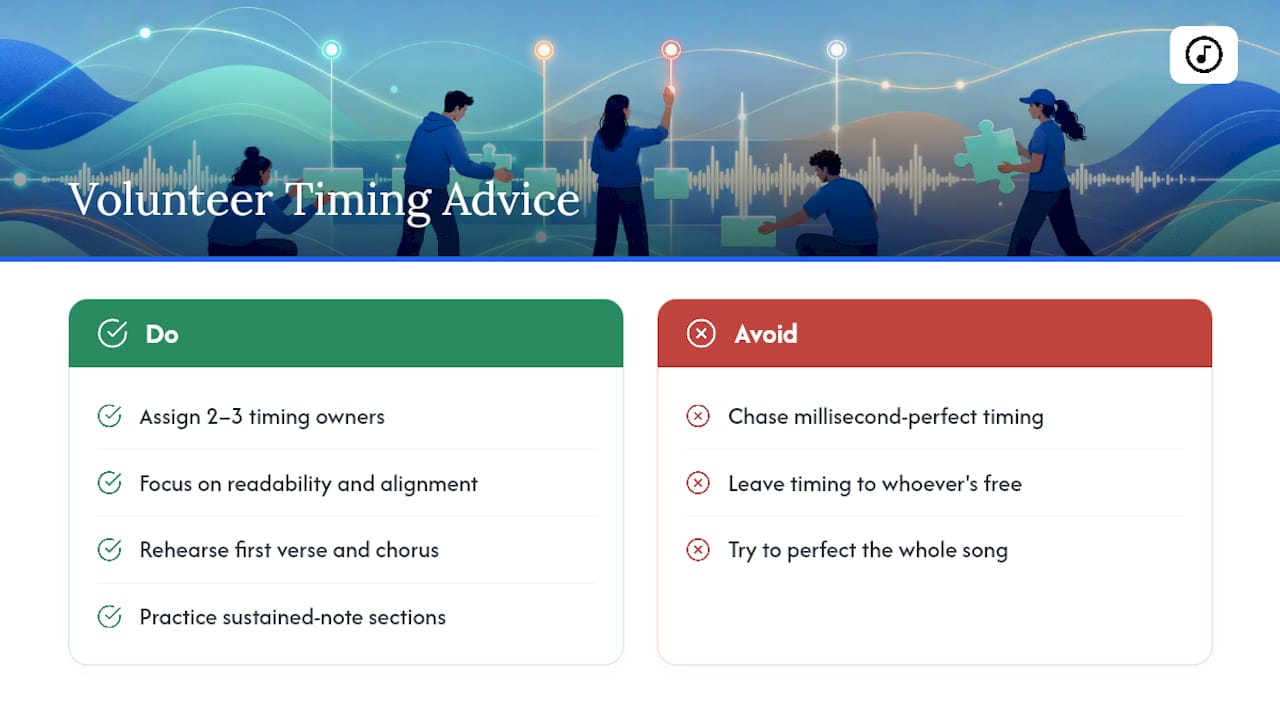
The teams that handle this well train two or three people to own timing and device checks specifically, rather than leaving it to whoever happens to be free that week. That consistency does more for reducing Sunday-morning stress than any single tool.
When rehearsal time is short, don't try to perfect the whole song. Prioritize the first verse, the chorus, and any section with sustained notes, since those are where a mistimed highlight is most visible and most disruptive to a congregation trying to sing along.
— Editorial team
Try The Workflow Inside the Platform
This platform serves as a practical alternative to juggling separate timing software, spreadsheets, and shared drives full of outdated lyric files. Instead of exporting and re-importing between tools, teams can handle import, offset adjustments, waveform nudging, and live presentation in one place, with changes syncing to every operator's device in real time.

If your team is still fixing timing issues live during service, that's usually a sign the rehearsal workflow needs tightening, not that your volunteers need more talent. Pairing a reliable onstage display setup with a platform that lets you nudge and preview lyrics before doors open removes most of the guesswork that causes Sunday scrambles.
You can try Song7's presentation mode, editor, and rehearsal tools with a free trial and see whether the three-stage workflow gets noticeably faster once your whole team is working from the same synced file.
Sources
- How to Create Enhanced LRC Files with Word Level Timing in 2026 | EasyLRC
- How to Time Lyrics to Music for a Lyric Video Without Editing Every Subtitle by Hand | Colorcoded
- Karaoke-Style Lyrics Guide ・ Composer
- Timed Lyrics Editor — Audio to Synced Lyrics | LyricTime
FAQ
What Is Lyric Advance Timing?
It's the process of setting when each lyric line or word appears on screen relative to the vocalist's actual singing, so the congregation can follow along without lagging behind or reading ahead.
Should I Use Line-Level Or Word-Level Timing?
Line-level timing works for most congregational worship because it's simpler to build and more forgiving of small phrasing changes; word-level (karaoke-style) timing is worth the extra effort mainly for songs with fast or unusual phrasing.
How Do I Know If I Need An Offset Or A Full Re-Time?
Check four points across the song. If the gap between lyric and voice stays the same everywhere, one global offset fixes it; if the gap grows, you're dealing with drift and need to re-time against the actual recording.
What Causes Lyrics To Drift Out Of Sync?
Drift usually comes from a version mismatch, like timing a file against a studio track when the band is playing a live arrangement with a different tempo or an added repeat.
Can Song7 Help With Lyric Timing Adjustments?
Song7 lets you apply offsets or nudge individual lines and words directly in the editor, then preview and sync those changes to every operator's device in real time before your service starts.