
For reliable, audience-friendly lyric display on stage, choose either a computerless wedge prompter for maximum reliability or a pedal-controlled tablet app for portability. Pick based on your venue, your operator's skill level, and your budget.
Here's the tradeoff in plain terms:
- Hardware wedge teleprompters run off USB/PDF files with no operating system to crash, which makes them the go-to for high-stakes, must-not-fail services.
- Tablet and laptop apps trade some of that bulletproof reliability for portability and on-the-fly editing.
If you lead a volunteer worship team, default to reliability. A hardware unit or a tool like Song7's presentation mode will serve you better than a fragile laptop setup. Solo and touring acts usually do better with a pedal-controlled tablet app. Whichever you pick, your first move is the same: export one clean, tested PDF or app-ready setlist before you do anything else.
Key Takeaways
Reliable onstage lyrics display comes down to matching your control method and hardware choice to your venue, your operator, and your rehearsal time, then testing everything under real stage lighting before the show.
| Point | Details |
|---|---|
| Match method to reliability needs | Choose computerless hardware for high-stakes shows and tablet apps for portability and quick edits. |
| Lock down typography | Use one clean sans-serif font like CMG Sans, high contrast, and consistent sizing across the whole set. |
| Build a real backup plan | Carry a spare device, a duplicate USB, and one printed lyric sheet as a last resort. |
| Test under real conditions | Run your five-minute check routine under actual stage lighting, not a quiet green room. |
| Streamline setlist prep with Song7 | Song7's presentation mode, real-time syncing, and instant transpose cut volunteer setup friction. |
Table of Contents
- Hardware, Tablet Apps, or DIY: Which Onstage Lyrics Display Fits You?
- What Fonts and Layouts Keep Lyrics Readable Onstage?
- Footswitch, Operator, or Auto-Scroll: How Do You Control Live Lyrics?
- How Do You Avoid Onstage Lyrics Display Failures?
- How Do You Prepare Setlist Files for Your Chosen Display Method?
- How Song7 Simplifies Onstage Lyrics Display for Worship Teams
- How Does Stage Lighting Affect Your Lyrics Display?
- What Actually Matters Most for Onstage Lyrics Display
- Get Your Team's Onstage Lyrics Display Running This Week
- Sources
- FAQ
Hardware, Tablet Apps, or DIY: Which Onstage Lyrics Display Fits You?
Every stage lyrics monitor option falls into one of three camps, and each one solves a different problem.
Hardware wedge teleprompters are computerless by design. They read PDF or JPG files straight from a USB stick and take footswitch commands, with no software updates or app crashes to worry about mid-set. Stageprompter's Wedge is a good example of the category: boot time is fast, the controller board is purpose-built, and an optional HDMI input lets you feed a second display. This is the choice when failure onstage simply isn't an option.
Tablet and laptop lyric apps give up some of that bulletproof simplicity for flexibility. You can edit lyrics between songs, transpose on the spot, and often import ChordPro files directly. This is the natural fit for solo performers and touring bands who need to travel light and change a set order on a whim.
Open-source and DIY tools like LyricDisplay and Prompt-Live sit at the technical end of the spectrum. They offer multi-output stage displays, footswitch and Bluetooth pedal support, and free licensing, but they demand a comfortable-with-tech volunteer to set up and test them properly.
Before you commit, run through this checklist:
- Is the venue setup permanent, or are you tearing down every week?
- Do you have a tech-capable operator, or does the performer need to self-control everything?
- How much rehearsal time can you realistically dedicate to testing the display?
- What's your budget, and how much visible hardware onstage are you willing to tolerate?
What Fonts and Layouts Keep Lyrics Readable Onstage?
Legibility comes down to a handful of concrete rules, not personal taste. Get these right and a singer can read your worship lyrics display from ten feet back under stage lighting without squinting.
- Pick one clean sans-serif font and stick with it for the whole set. Gotham, Myriad Pro, Avenir, and CMG Sans all show up repeatedly in worship lyric fonts recommendations because they hold up at distance and under harsh lighting.
- Keep lines short. Long lines force eyes to travel too far across a slide, which slows recognition exactly when a singer needs the next phrase fastest.
- Use sentence case or title case consistently. ALL CAPS looks bold in a mockup but actually reduces reading speed because it strips away the word-shape cues readers rely on.
- Maximize contrast. Light text on a solid dark background beats any textured or photo backdrop, which fights for attention against the words themselves.
- Add generous line spacing. Leading that's too tight makes lyrics feel cramped and harder to scan at a glance.
Consistency across the entire set matters more than any single "creative" choice. Font and layout inconsistency is one of the most common mistakes worship presenters make, and it shows up as hesitation onstage, not just as a design critique afterward. Skip animated transitions entirely. They look nice in a demo reel and distract a singer trying to keep their place mid-verse.
Pro Tip: Build one template with your font, size, and spacing locked in, then duplicate it for every song. Never adjust font size song-to-song just because a lyric line runs long.
Footswitch, Operator, or Auto-Scroll: How Do You Control Live Lyrics?
Three control methods cover almost every onstage lyrics display setup, and each has a clear best-fit scenario.
- Footswitch or MIDI pedal control is the most reliable, hands-free option and the right default for a solo singer or worship leader who also plays an instrument. Basic HID pedals are inexpensive and pair with most tablet apps and hardware units alike.
- A dedicated tech operator at the sound desk works well when the performer needs to stay fully focused on the audience rather than glancing at a display or timing a foot tap.
- Auto-scroll with tempo-sync fits well when you're running to a backing track, but the timing has to be tested in rehearsal, not guessed at during soundcheck.
Whatever primary control you choose, build a fallback. If a footswitch dies mid-song, the operator should be watching and ready to take over navigation within seconds. If the operator gets pulled away, the performer needs a printed lyric sheet within arm's reach. A confidence monitor lyrics setup is only as good as its backup plan.
How Do You Avoid Onstage Lyrics Display Failures?
Reliability isn't a feature you buy. It's a checklist you run every single time.
- Treat computerless hardware or an exported PDF as your primary file for anything critical. Software crashes; a PDF on a USB stick does not.
- Carry redundant copies: a spare tablet or phone loaded with the same setlist, a duplicate USB stick, and one printed lyric sheet as an absolute last resort.
- Physically check power, HDMI or USB connections, boot time, and footswitch response before doors open, and confirm the display is actually visible from where the performer stands.
- Run a full dress rehearsal under real stage lighting, and write down a one-minute recovery plan the whole team knows by heart.
A short pre-show routine covering boot, setlist load, footswitch check, and a transpose test catches almost every failure before it becomes a live problem, based on common troubleshooting patterns documented by LyricDisplay's setup guidance.
Pro Tip: Run your five-minute test routine at the exact volume and lighting level you'll use during the show, not in a quiet, well-lit green room. Screens read differently under stage wash.
How Do You Prepare Setlist Files for Your Chosen Display Method?
A clean workflow saves you from last-minute chaos backstage, and it starts with one master file, not five scattered documents.
- Keep a single master source in plain text or ChordPro format, then export from it: PDF or JPEG for hardware prompters, and the native app format for tablets. Maintaining one source file and exporting per device cuts down on version-control errors that creep in when you edit five copies separately.
- Name files with a numeric prefix matching set order (01_openingsong.pdf, 02_secondsong.pdf) so navigation during a live show never depends on memory.
- If you expect a key change mid-service, export a separate version per key rather than trying to transpose live on an unfamiliar screen.
- Test the exact import and export process on the exact device and control method you'll use onstage, well before the actual performance, not the morning of.
This is where a lot of volunteer teams lose time they don't have. A drag-and-drop setlist builder that transposes instantly and syncs across every team member's device removes most of that manual export-and-rename cycle entirely.
How Song7 Simplifies Onstage Lyrics Display for Worship Teams
Song7 was built around exactly this problem: getting worship lyrics display right without asking volunteers to become AV technicians.
- Presentation mode shows clean, formatted lyrics on any connected screen, with drag-and-drop setlist building so song order changes take seconds, not a re-export.
- Real-time team syncing means when a leader swaps a song or adjusts a key, every team member's screen updates instantly, no group text required.
- Transpose and chord diagrams update together, so a last-minute key change doesn't leave your display lyrics from iPad setup out of sync with what the band is actually playing.
- Import options pull in ChordPro files, plain text, or even photos of handwritten charts, so migrating an existing library doesn't mean retyping everything.
- Built-in metronome and rehearsal tools help a team practice the exact flow they'll run onstage, footswitch timing included.
Rolling it out doesn't require an overhaul. Test with one projector or display first, rehearse your footswitch or remote flow with it, then bring the rest of your volunteers in once the workflow feels solid.
Volunteer teams don't fail because they lack talent. They fail because the tools around them create friction at the exact moment focus matters most.
Pro Tip: Onboard one volunteer operator at a time. A confident single operator beats three people fumbling with a new tool mid-rehearsal.
How Does Stage Lighting Affect Your Lyrics Display?
Bright stage wash is the enemy of a dim screen. If your onstage lyrics display sits anywhere near the light rig's spill, glare and washout can make even a well-designed slide unreadable from three feet away.
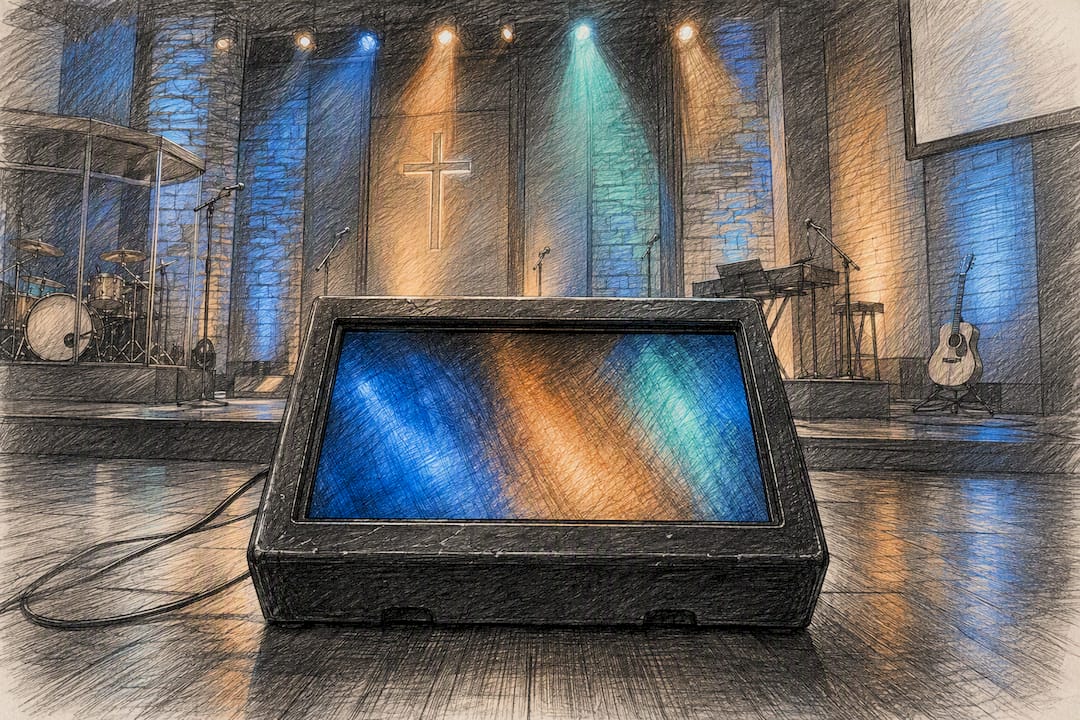
Positioning solves most of this. A wedge-style prompter angled away from direct light and housed to mimic a floor monitor hides the screen from the audience while cutting glare for the performer. That angled housing does two jobs at once: it protects the visual illusion that a singer knows every word cold, and it keeps the display readable without cranking brightness to compete with stage lighting.
For tablet setups, brightness needs adjusting per venue, not set once and forgotten. A tablet that looks perfectly readable in a dim rehearsal room can wash out completely under a 500-watt LED wash during the actual show. Test your display's brightness under the real lighting rig during a full rehearsal, not in a green room with the lights off.
Screen placement matters just as much as brightness. A monitor mounted too high forces a performer to tilt their head back, breaking eye contact with the audience and looking obviously like they're reading. Keep it low, angled, and close enough for a quick glance rather than a stare. The goal is a performer who looks connected to the room, not buried in a script.
What Actually Matters Most for Onstage Lyrics Display
Most advice on this topic obsesses over software features and ignores the one variable that actually determines whether a show goes smoothly: how well the system was tested before doors opened. A stunning font choice or a slick auto-scroll feature means nothing if nobody ran a full dress rehearsal under real stage lights.
The conventional wisdom leans too hard toward "which app is best" and too lightly toward "did you actually rehearse with it." A five-minute pre-show test routine prevents more failures than any single tool upgrade ever will. That's not a popular take because it's less exciting than comparing gadgets, but it's the difference between a confident performance and a visible scramble.
If you take one thing from this guide, prioritize rehearsal time over feature lists. Pick a tool, whether that's a hardware wedge or a platform like Song7, that fits your team's actual skill level, then spend your remaining prep time testing it under pressure rather than shopping for a better one.
— Editorial team
Get Your Team's Onstage Lyrics Display Running This Week
Song7 removes the manual export-and-rename cycle that eats up volunteer time before every service. Instead of juggling separate PDFs, chord charts, and text files, your whole team works from one synced setlist that updates instantly when a leader changes a key or swaps a song.

That matters most in the exact moment this guide has been building toward: the five minutes before doors open, when you need your display, your chord charts, and your team's phones all showing the same thing without a scramble. Song7's presentation mode, drag-and-drop setlist builder, and real-time syncing were built specifically for volunteer-based teams who don't have a dedicated AV technician on staff. Start a free trial at Song7 and test your presentation mode with your actual worship set before your next rehearsal.
Sources
FAQ
How Do You Introduce a Song Performance on Stage?
Keep it short and specific. Name the song, give one sentence of context if it matters emotionally, and cue your band or backing track before momentum drops.
What Is the Best App for Singers to Use While Performing on Stage?
The best real-time song lyrics app depends on your setup. Solo performers often prefer a pedal-controlled tablet app for portability, while worship teams needing team sync, transpose, and drag-and-drop setlists tend to fit best with a platform like Song7.
What File Format Should Song Lyrics Be In?
Plain text or ChordPro works best as a master source because it exports cleanly to PDF for hardware prompters and to app-native formats for tablets. Keep separate exports per key if you expect to transpose mid-performance.
What Are Good Songs to Sing on Stage?
Song choice depends heavily on venue and audience, but the display side of the equation stays the same regardless of setlist: clean sans-serif fonts, high contrast, and consistent formatting keep any song readable under stage lighting.