
The fastest way to convert PDF chord charts is to match your method to your source file: import searchable PDFs directly into a chord tool, run OCR on scanned images, and hand-retype only the messiest handwritten copies. Once you have text, proof it against the original and export to ChordPro, TXT, or straight into your worship app. Tools like Flat handle notation-heavy imports, ChordPro handles plain text charts, and Song7's editorial team has walked enough volunteer teams through this to know where the process usually breaks.
TL;DR:
- Converting searchable PDFs is straightforward, but image or handwritten charts require OCR or manual retyping for accuracy.
- Quality source images at 300-400 DPI with good lighting to improve OCR results and reduce errors during conversion.
- Always proofread and adjust chords for correct placement and labeling, especially when dealing with dense or complex layouts.
- Use ChordPro format for maximum portability and easy transposition across different devices and apps.
- Regularly convert and sync charts via a shared platform to ensure all team members access the same, up-to-date versions before rehearsals.
Table of Contents
- Which Conversion Path Fits Your PDF?
- How Do You Convert a Chord Chart Step by Step?
- What Tools Should You Use for Different Needs?
- How Do You Avoid the Most Common Conversion Mistakes?
- Why Text-Based Formats Matter for Worship Teams
- How Do You Convert Complex or Handwritten Chord Charts?
- Will Your Converted Chart Work Across Every App and Device?
- How Do You Keep Lyrics Aligned With Chords After Converting?
- What Actually Separates a Good Conversion From a Bad One
- Keep Your Converted Charts Synced Across the Whole Team
- Sources
- FAQ
Which Conversion Path Fits Your PDF?
Not every PDF chord chart deserves the same treatment. Before you touch a single tool, figure out what kind of file you're actually holding.
- Text-based (searchable) PDF: This is the easy case. If you can highlight text with your cursor, a converter can extract it directly, no guesswork involved.
- Image or scanned PDF: These are photographs or flattened scans with no underlying text layer. You'll need OCR (optical character recognition), and results vary depending on print clarity.
- Handwritten or low-quality photo: OCR tools choke on handwriting almost every time. For a one-page chart, retyping it yourself in five minutes often beats fifteen minutes of fighting bad software output.
- Privacy considerations: Local, browser-based tools process files on your device and never touch a server, while cloud converters upload your chart somewhere else first. For a church's original arrangements or licensed charts, that distinction matters more than most volunteers realize.
Searchable PDFs consistently produce cleaner results than scanned images, according to PDF-Lab's comparison of searchable versus text-only PDFs. Knowing which type you have before you start saves you from picking the wrong tool.
How Do You Convert a Chord Chart Step by Step?
Here's the process that actually holds up under rehearsal-week pressure, when you don't have time to babysit a converter.
- Inspect the PDF first. Open it and try to select a line of text with your cursor. If text highlights, it's searchable. If nothing selects, or the whole page acts like one image, you're dealing with a scan.
- Choose your tool based on that result. For searchable PDFs, use a direct text importer or a browser-based chord sheet generator. For image PDFs, run OCR through a music-aware tool if one is available, since generic OCR often misreads chord symbols like "Bm7" as stray characters.
- Clean up the raw output. This step is non-negotiable. Realign chords that landed above the wrong syllable, fix any chord names OCR mangled (a common one: "C#" reading as "C4" or "C+"), and standardize section labels so every chart says "Verse 1" and "Chorus" instead of a mix of "V1," "Vs. 1," and "Verse One."
- Export to a text-based format. ChordPro and plain TXT are the most portable choices, and both travel well into apps built for live use. Test the transposition function immediately after exporting. If a chord shifts incorrectly, the export likely mislabeled a root note during OCR.
- Do a device check before rehearsal. Pull the chart up on the actual tablet or phone you'll use on stage, ideally in dim lighting or your app's performance mode. Text that looks fine on a laptop screen sometimes crowds or truncates on a smaller display.
Pro Tip: Keep the original PDF open in a second window while you proof. Side-by-side comparison catches misplaced chords about three times faster than toggling between two open tabs.
Most conversions need at least a short manual correction pass. Even well-designed OCR-based songbook workflows expect a review step after the automatic pass runs.
What Tools Should You Use for Different Needs?
The right tool depends on what you're optimizing for. Speed, accuracy, and privacy rarely max out together, so pick the priority that matters for the chart in front of you.
- Browser-based chord sheet generators work well when you already have clean text or a searchable PDF and just want fast output. Tools like Chords.me's PDF generator accept ChordPro or bracketed chord text and produce presentation-ready PDFs without a server round-trip.
- Notation importers, particularly Flat, earn their keep when you need actual tab or notation, not just chord symbols over lyrics. Flat's PDF import typically brings across notes, rhythms, chord symbols, and lyrics on the first pass, though faint print or dense passages usually need a manual fix afterward.
- Developer and CLI rendering tools, such as the chordpdf project on GitHub, suit anyone comfortable scripting a repeatable pipeline. If your church maintains dozens of charts in a shared text format, a renderer like this can batch-produce clean PDFs without manual formatting each time.
- Mobile scanner and OCR apps cover the on-the-fly case: a photo of a chart taped to a music stand, or a folio page nobody digitized years ago. A browser tool such as FlowPDF can also handle quick local conversions without uploading anything, which matters if the chart is a personal arrangement you'd rather not send to a stranger's server.
How Do You Avoid the Most Common Conversion Mistakes?
Most conversion frustration traces back to a small set of repeat offenders. Fix these and your error rate drops sharply.
- Scan quality determines everything downstream. A scan shot at 300 to 400 DPI with even lighting and a tight crop produces dramatically fewer OCR errors than a phone photo taken at an angle under fluorescent light. PDF-Lab's research backs this up directly: source quality is the single biggest predictor of conversion accuracy.
- Watch for fused lines and misread chords. OCR sometimes merges a chord line into the lyric line below it, or reads "Am" as "Arn." A quick scan for anything that looks like gibberish usually catches these fast.
- Convert just-in-time, not in bulk. Converting your entire song library in one weekend sounds efficient but usually backfires, since fatigue sets in and error rates climb by song fifteen. Convert what's on this week's setlist and let next week wait for next week.
- Handle capo and tuning carefully. If a chart specifies a capo or alternate tuning, note it explicitly in the exported file rather than assuming the app will infer it. When in doubt, prefer your app's built-in transposer over manually rewriting every chord, since flat-note tuning and capo settings are exactly the kind of detail that gets lost in translation during import.
Pro Tip: If you're converting a chart with a capo, write the original key and the capo position directly into the chart's title line. Six months from now, you won't remember which version you built for which guitarist.
Why Text-Based Formats Matter for Worship Teams
A PDF is a dead end for a team. Nobody can transpose it on the fly, and every device renders it slightly differently depending on screen size and app. A text-based format like ChordPro solves both problems at once: transposition becomes instant and error-free, and the same file displays consistently whether it's opened on a phone, tablet, or projector.
Standardizing on one format, rather than letting the team accumulate PDFs, TXT files, and screenshots from five different sources, is worth the upfront effort. Song7's own guide to the ChordPro format walks through the syntax in more depth if you want to build charts that stay portable for years, not just this Sunday.
How Do You Convert Complex or Handwritten Chord Charts?
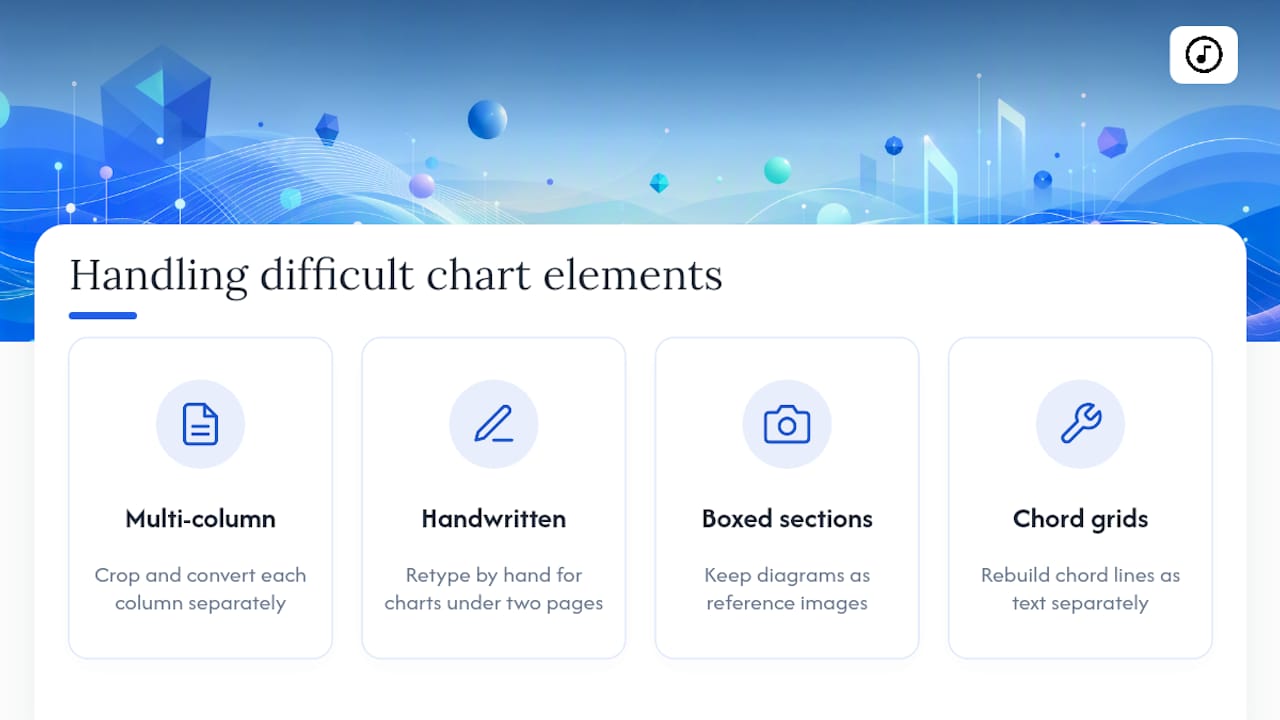
Complex layouts break OCR faster than anything else. Charts with two columns, boxed repeat sections, chord diagrams sitting above the staff, or handwritten pencil corrections scrawled in the margin confuse software that expects a simple top-to-bottom flow of text.
For multi-column layouts, crop and convert each column separately if your tool allows it. Running the whole page through OCR at once often scrambles the reading order, stitching the bottom of column one to the top of column two.
Handwritten charts are close to a lost cause for automated tools. Handwriting recognition has improved, but chord shorthand (a slash chord scrawled quickly, a capo note jotted in the corner) trips up even strong OCR engines. For anything shorter than two pages, retyping by hand is usually faster than correcting garbled OCR output, and it forces you to actually read the chart carefully, which catches errors you'd otherwise miss.
Boxed or diagram-heavy sections, like a chord grid dropped mid-chart, rarely convert cleanly at all. Treat those as images to keep as reference and rebuild the chord line as text separately. Trying to force a diagram through a text extractor usually produces unreadable symbols that take longer to fix than to rewrite.
Will Your Converted Chart Work Across Every App and Device?
Format choice determines how far your converted chart can travel. ChordPro is close to universal among dedicated chord and lyric apps, which makes it the safest export target if your team uses a mix of devices. Plain TXT works almost everywhere but loses structural cues like section headers unless you format them consistently yourself.
PDF, ironically, is the least portable format once you need to edit or transpose anything. It displays reliably, but it's a dead end for collaboration.
Screen size matters more than people expect. A chart that looks perfectly spaced on a laptop can crowd chord symbols into lyrics on a phone screen, especially in landscape mode during a live set. Test any newly converted chart on the smallest screen your team actually uses before the rehearsal, not after. Song7's guide to formatting chord charts for worship teams covers the layout adjustments that make the biggest difference for live readability across different devices.
If your team splits between tablets, phones, and printed backups, keep the master file in ChordPro or TXT and let each device generate its own display version. That keeps one source of truth instead of five slightly different PDFs floating around a group chat.
How Do You Keep Lyrics Aligned With Chords After Converting?
Chord and lyric alignment is the detail OCR breaks most often, and it's also the easiest to miss during a quick proofread. A chord that's supposed to land on the second syllable of "faithful" can drift a full word to the left or right after conversion, and you won't notice until someone strums the wrong chord mid-verse.
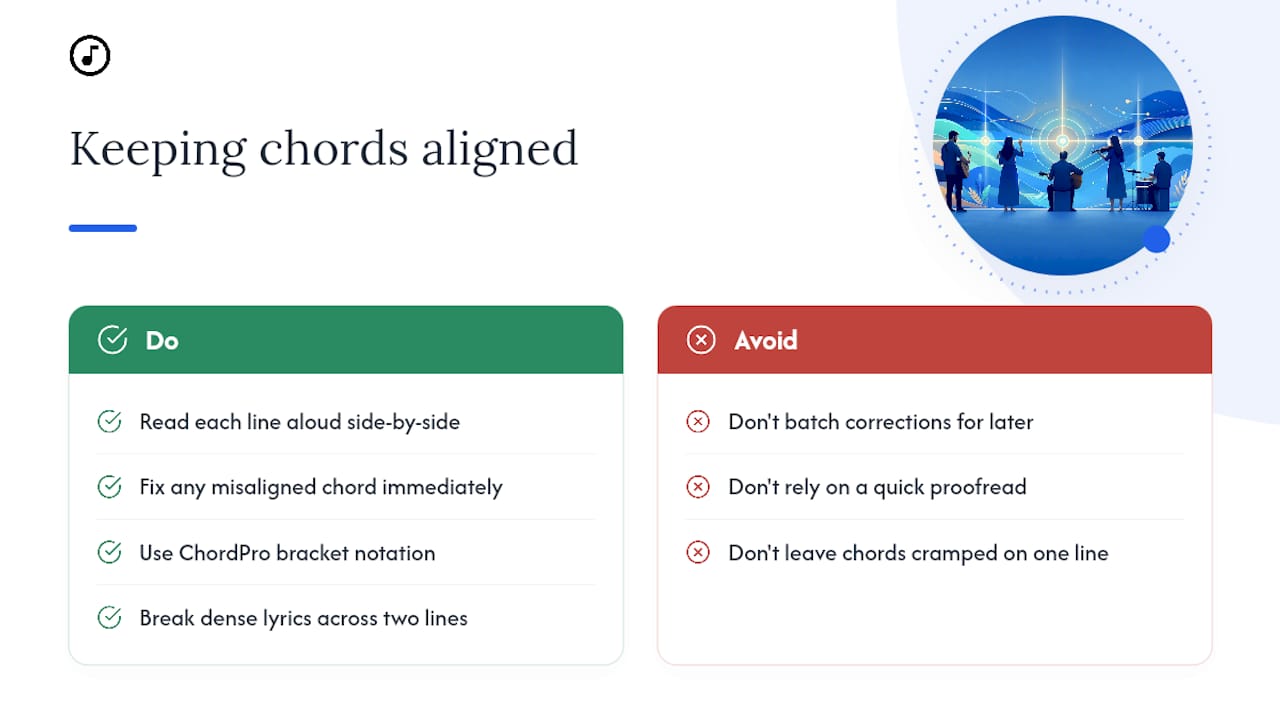
Read through each line out loud, chord names included, comparing against the original PDF side by side. If a chord sits oddly relative to the lyric beneath it, nudge it back into place before moving to the next line rather than batching corrections for later.
For charts with dense chord changes, ChordPro's bracket notation, placing the chord directly inside the lyric line like [G]Amazing [C]grace, how [G]sweet the sound, actually preserves alignment better than the traditional two-line format most PDFs use. Once you convert to that style, the chord physically can't drift from its syllable, because it's embedded in the text itself. Song7's post on displaying chords with lyrics shows what this looks like in practice for a live display.
If a section has rapid chord changes packed into one line, consider breaking the lyric across two lines in your export just to give each chord visual breathing room. Cramped alignment is where most on-stage mistakes happen, not missing chords.
What Actually Separates a Good Conversion From a Bad One
The advice you'll find most places treats conversion like a one-time task: run the file through a tool, call it done. That's backwards. The teams that get reliable results treat conversion as an ongoing habit tied to the setlist, not a library project you knock out in one weekend.
The conventional wisdom oversells automation. OCR and PDF importers have gotten genuinely good, but every conversion still needs a human proofread against the original. Skip that step and you're one misread chord symbol away from a train wreck during the second verse.
What gets underestimated is source quality. A blurry phone photo of a chart taped to a stand will never convert as cleanly as a proper scan, no matter how good your software is. If you're the one printing or scanning charts for your team, that fifteen extra seconds of care at the scanner saves everyone a frustrating rehearsal later.
Prioritize this week's songs first. Convert what you need, proof it well, and let the rest of your library wait its turn. Perfect coverage of songs nobody's playing this Sunday isn't worth the burnout.
— Editorial team
Keep Your Converted Charts Synced Across the Whole Team
Once you've converted a chart into ChordPro or TXT, the next challenge is getting it into every musician's hands correctly, in the right key, before rehearsal starts. That's where a shared platform fills the gap after conversion.

Some platforms let you import your freshly converted chord charts directly into a shared setlist, where every team member sees the same chart, same key, updated in real time if you make a last-minute change. Presentation mode handles the on-stage display so nobody's squinting at a cramped PDF, and instant transposition means musicians can read the version that makes sense for them, off the same source file. Try it with a single week's setlist first: convert your handful of Sunday songs, import them, and see how much smoother rehearsal feels when nobody's texting "wait, what key is this in?" the night before. You can start a free trial at Song7 and test the full workflow on your next service.
Sources
For deeper technical detail, PDF-Lab's guide on searchable versus scanned PDFs and Flat's walkthrough on PDF-to-notation conversion cover the mechanics this article builds on. Song7's post on transposing chord charts expands on the in-app steps.
- Searchable PDF vs text-only PDF (PDF-Lab)
- Flat blog — PDF to guitar sheet music
- anbcodes/chordpdf on GitHub
FAQ
Can I Convert a PDF Chord Chart Without Special Software?
Yes, if the PDF is text-based, you can often copy and paste the text directly into a plain document. Scanned or image PDFs need OCR software, since there's no text layer to copy.
What's the Best Format to Export a Converted Chart Into?
ChordPro is the most portable choice for team use, since it works across most chord and lyric apps and supports instant transposition. Plain TXT is a solid fallback if your app doesn't support ChordPro.
Does OCR Work Well on Chord Symbols?
Generic OCR frequently misreads chord symbols like sharps, flats, and slash chords, so expect to proofread every converted chart. Music-aware OCR tools tend to perform better than generic text scanners on these specific characters.
Should I Convert My Entire Song Library at Once?
No, converting only the songs on your upcoming setlist keeps quality higher and prevents the fatigue-driven errors that creep in during large batch jobs. Convert as you go, week by week.
How Do I Keep My Converted Charts Synced Across My Team?
Standardizing on one text-based format and syncing it through a shared platform like Song7 keeps everyone looking at the same version, in the same key, without emailing PDFs back and forth.