
If your worship team keeps hitting sync headaches or someone's still holding the wrong chord chart during the bridge, Song7 is the OnSong alternative built specifically for that problem, with Songbook Pro, nkoda, Newzik, and SetBook rounding out the field depending on your setup. Teams switch for three reasons: real-time sync across devices, painless imports from ChordPro or PDF, and setlist workflows volunteers can actually learn in a weekend. Scan the comparisons below, then jump to the migration checklist when you're ready to move.
TL;DR:
- Real-time sync and role-based editing are crucial, as some apps like Song7 are designed specifically to ensure all volunteers see the same updates instantly.
- Compatibility across devices varies greatly; Song7 works on multiple platforms, while Songbook Pro is limited to iOS, affecting team hardware choices.
- Import support for ChordPro and PDF files is essential to avoid manual re-entry, with full library migration recommended only after testing sync and transpositions during rehearsals.
- Support quality differs, with published help centers like nkoda offering more reliable assistance, while smaller apps may depend on personal responses with longer wait times.
- App store ratings can be misleading; focus on reviews mentioning team use, sync reliability, and recent updates to determine if an app suits worship team needs.
Table of Contents
- Which OnSong Alternatives Actually Fit Worship Teams?
- What Actually Breaks on Stage: A Feature Comparison
- How Do You Choose the Right Replacement?
- Why Song7 Was Built for This Exact Job
- How Good Is Support When Something Breaks Mid-Rehearsal?
- What Do Reviews Actually Tell You About These Apps?
- When Is Switching From OnSong Actually Worth It?
- Ready to Move Your Team Off OnSong?
- Sources
- FAQ
Which OnSong Alternatives Actually Fit Worship Teams?
Not every sheet music app was built for the same job, and that's the first thing to sort out before you download anything. Some of these tools were designed for solo gigging musicians, some for orchestras, and only a couple were built with a volunteer worship team in mind.
Song7 is a setlist and song management platform built for church music teams specifically. It runs as a subscription SaaS with a free trial and offers instant sync, drag-and-drop setlist building, and a presentation mode designed for team use. If your team has ever shown up to rehearsal with three different versions of the same chart, this is the gap Song7 was built to close.
- Songbook Pro is an iOS-focused digital songbook that's popular with solo performers and small acoustic groups. It's distributed through the App Store as a paid app, and many users specifically call out the one-time purchase option rather than a recurring subscription. If you're a single musician who wants to pay once and be done, that's a real advantage. It's a thinner fit for a team of six volunteers who all need to see the same setlist update in real time.
- nkoda is a subscription-based sheet music library with a large publisher-licensed catalog and availability across multiple platforms including the Microsoft Store. It's built for musicians who need legitimate, licensed scores, not chord charts typed up by a volunteer. Worship bands running mostly lead sheets and ChordPro files won't use most of what nkoda offers.
- Newzik focuses on collaborative score reading with real-time annotation sharing, which makes sense for conductor-led ensembles marking up parts together. It's a strong tool if you run an orchestra or choir with printed scores. It's not built around chord charts, transposition, or the kind of lyrics-and-chords display a worship set typically needs.
- SetBook is a broader gig-management platform that bundles setlists with scheduling and band invites, aimed at working bands juggling multiple gigs and members. That scheduling layer is genuinely useful for a band with a packed calendar. It's less specialized around the specific rhythm of a weekly worship service, where the setlist itself, not the booking calendar, is the daily pressure point.
What Actually Breaks on Stage: A Feature Comparison
The feature that looks impressive on a marketing page isn't always the one that saves your Sunday. Sync reliability, import compatibility, and how an app behaves when the Wi-Fi drops mid-service matter far more than a long spec sheet.
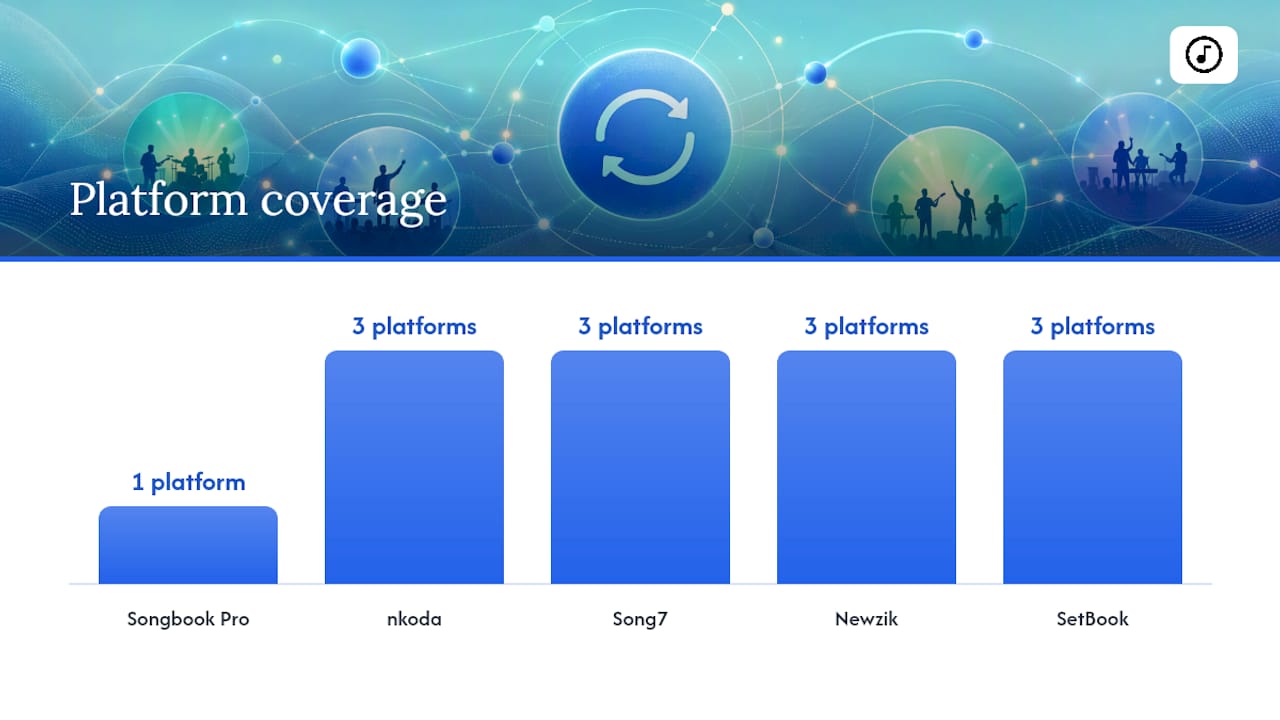
Platform compatibility shapes what hardware your team can actually use. Songbook Pro is iOS-only, which is fine if your whole team runs iPads but a dead end if half your volunteers use Android tablets. nkoda spans iOS, Android, and Windows through stores like Microsoft's. Song7 is built to work across the devices a typical volunteer team already owns, so you're not forcing anyone to buy new hardware just to join rehearsal. If your team uses page-turn pedals like an AirTurn, confirm the app supports Bluetooth foot controllers before committing.
Sync and collaboration is where most OnSong switches actually start. Real-time sync means a chord change made Tuesday night shows up on every device by Wednesday's rehearsal, not just on the leader's iPad. Role-based sharing matters too: you want your rhythm guitarist editing capo notes without accidentally deleting the vocalist's key change.
Import and export determines how painful moving your library will be. ChordPro and PDF support are the baseline; a direct OnSong backup import saves hours of manual re-entry.
| App | Platforms | Sync & collaboration | Import/export formats | Pricing model | Best for | Standout feature |
|---|---|---|---|---|---|---|
| Song7 | Web, iOS, Android | Real-time team sync, role-based sharing | ChordPro, text, photo import | Subscription, free trial | Volunteer worship teams and small churches | Simple team sync plus built-in metronome |
| Songbook Pro | iOS, iPadOS | Local device, limited team sync | PDF, ChordPro | One-time purchase | Solo performers on iPad | Single-payment ownership |
| nkoda | iOS, Android, Windows | Cloud library access, not collaborative editing | Publisher-licensed scores | Subscription | Musicians needing licensed sheet music | Large publisher catalog |
| Newzik | iOS, iPadOS, Android | Real-time annotation sharing | PDF scores, MusicXML | Subscription/freemium | Ensembles and conductors | Collaborative score markup |
| SetBook | iOS, Android, web | Setlist sharing plus scheduling | PDF, text charts | Subscription | Bands managing multiple gigs | Setlist and scheduling combined |
Audio and backing tracks separate the apps further. Some handle tempo-locked playback and an integrated metronome inside the same screen you're reading lyrics from; others expect you to route audio through a separate player entirely, which adds another point of failure during a live transition. Before trusting any app on a Sunday, check its App Store or Microsoft Store listing for update frequency and read a handful of recent reviews. An app that hasn't shipped an update in over a year is a quieter warning sign than a bad rating.
How Do You Choose the Right Replacement?
Run through this checklist before you commit a whole team to a new app:
- Map your device mix. Count how many volunteers use iPad, iPhone, Android, or a laptop at the music stand, then cross off any app that doesn't cover all of them.
- Weigh rehearsal needs against gig-day needs. A solo songwriter and a six-person worship band need different things from "collaboration."
- Test real-time sync live. Have two people open the same setlist on two devices and change a chord on one. If it doesn't appear on the other within a few seconds, that's your answer.
- Import a real folder, not one song. Pull 10 to 30 files, mixing PDFs and ChordPro, and check that chords line up and transpose correctly.
- Try presentation mode with a remote page turn. This is the moment most apps quietly fail during an actual service.
Pro Tip: Don't migrate your whole library on a Sunday morning. Run a rehearsal-only test migration first, and only move the full song catalog once your team has confirmed sync and imports work under real conditions.
Red flags worth walking away from: missing ChordPro or PDF import, no offline mode for when the church Wi-Fi inevitably drops, pricing that's unclear about per-user costs for a growing team, and sync that silently overwrites someone's edits instead of flagging the conflict.
Why Song7 Was Built for This Exact Job
Song7 exists because worship teams kept running into the same wall: too much admin, not enough clarity heading into Sunday. The platform gives you instant sync of song updates, drag-and-drop setlist building, one-tap transposition, and a dedicated presentation mode, alongside chord diagrams and a built-in metronome for rehearsal. None of that is complicated by design.
The emphasis throughout is on volunteers who don't have hours to learn new software between their day job and Sunday. If your team is migrating from OnSong, resources like how to organize your church song library and formatting chord charts to avoid mid-song errors walk through the practical side of the move.
How Good Is Support When Something Breaks Mid-Rehearsal?
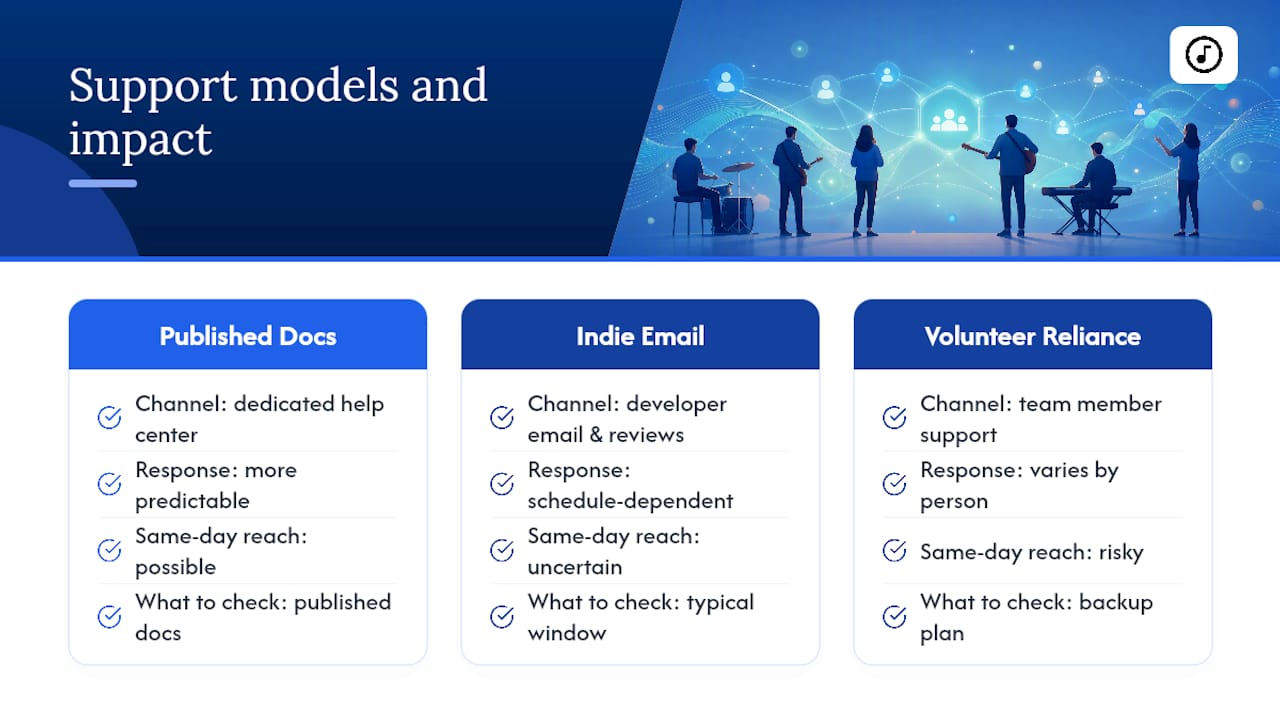
Support quality varies more across these apps than most feature lists let on. nkoda publishes a dedicated help center covering account issues and app behavior, which gives you somewhere concrete to check before you buy, not just a contact form that vanishes into a queue. That kind of published documentation is worth checking for any app you're considering, since it tells you whether a team actually maintains the product or just shipped it and moved on.
Smaller, indie-built apps like Songbook Pro tend to rely more on developer email responses and App Store review threads than a formal ticketing system. That's not automatically bad. It just means your response time on a Saturday night before a Sunday service depends heavily on one person's schedule.
For a volunteer-run team, the real question isn't whether an app has a support page. It's whether someone on your team can actually get unstuck without a two-day wait. Ask any app you're trialing directly: what's the typical response window, and is there a way to reach someone same-day if sync breaks during a live rehearsal. If the answer is vague, treat that as data, not an accident.
What Do Reviews Actually Tell You About These Apps?
App Store and Microsoft Store ratings are a starting point, not the whole story. A high star average tells you an app generally works. It doesn't tell you whether it works for a six-person volunteer team syncing chord charts in real time, which is a much narrower and more demanding use case than a solo performer flipping through a personal songbook.
Read reviews with your actual use case in mind. A five-star review from a solo guitarist praising Songbook Pro's one-time purchase model tells you almost nothing about how that app handles four people editing a setlist simultaneously, because that's not what the reviewer was testing. Look instead for reviews and forum threads that specifically mention team use, sync reliability, or migrating from another app. Those are the ones that map onto your actual situation.
Pay attention to how recently reviews were posted, too. An app with strong ratings from three years ago and silence since could mean it's stable and finished, or it could mean development has stalled. Cross-check the review pattern against the app's update history before you trust it with your team's Sunday.
When Is Switching From OnSong Actually Worth It?
Switching earns its keep when sync failures leave someone holding a stale chart mid-set, or when volunteers keep getting confused about which version is current. If your setup already works and nobody's confused, staying put is a reasonable call. Either way, test on a rehearsal, not a live service.
— Editorial team
Ready to Move Your Team Off OnSong?
Song7 provides worship teams with reliable sync functionality to help keep the whole team updated without manual double-checks before services. Setlists build with a drag and drop, chord charts update everywhere at once, and presentation mode keeps everyone looking at the same screen, including volunteers who joined the team last month.

Start small. Import a handful of songs from your existing library, invite two team members to test sync in real time, and run through presentation mode before your next rehearsal. If it holds up there, you'll know it holds up on Sunday. You can explore Song7's features or check out the setlist builder and church music stand tools to see the full toolkit before you commit your whole team to the switch.
FAQ
Is OnSong or Songbook Pro Better for a Worship Team?
Songbook Pro suits solo performers who want a one-time iOS purchase rather than a subscription, but it wasn't built for team-wide real-time sync. Worship teams that need every volunteer seeing live chart updates typically need software with built-in team collaboration, which is the gap Song7 was designed to fill.
What's the Difference Between Newzik and OnSong, and Which Fits Me?
Newzik is built around collaborative score annotation for ensembles and conductors working from printed scores, while OnSong-style tools focus on chord charts and lyrics for live performance. If your worship team runs chord sheets rather than full scores, a chord-chart-first tool fits better than a score-annotation app.
Is There a Free Version of OnSong or a Free OnSong Alternative?
OnSong itself doesn't offer a full free tier, but several alternatives including Song7 offer a free trial so you can test sync and setlist building before paying. Check each app's current pricing page directly since terms change.
What's the Best App for Backing Tracks in a Worship Setting?
The best fit depends on whether you need integrated playback inside the same screen as your lyrics or are comfortable routing audio through a separate player. Test backing-track playback directly during a trial rehearsal, since latency and tempo sync are easier to judge live than from a feature list.
How Do I Migrate My OnSong Library to a New App?
Back up your existing OnSong library first, then bulk-import a representative folder of 10 to 30 songs, mixing PDFs and ChordPro files, into a test account. Confirm chords align and transpose correctly, then run a full rehearsal sync before moving your entire catalog over.