
Use a worship-first cloud collaboration platform instead of juggling group texts, shared drives, and printed chord charts. It's the fastest way to cut Sunday-morning chaos and keep every volunteer on the same page, literally.
Two reasons make this the right call for church cloud collaboration. First, real-time sync means a key change made Thursday night shows up on every musician's phone before rehearsal, not after. Second, worship-specific platforms are built for the people who actually use them: volunteers who have five minutes between work emails and dinner, not IT staff. Skip the trial-and-error phase. Here's your next move:
- Schedule a one-hour pilot with your worship team this week, or
- Start a free trial of a worship-focused platform and import next Sunday's set before you do anything else.
Everything below explains what to look for, how to roll it out without losing your volunteers to frustration, and how a tool like Song7 fits the checklist.
Key Takeaways
Worship-focused cloud platforms reduce Sunday-morning errors because real-time sync and volunteer-friendly roles solve problems generic file sharing cannot.
| Point | Details |
|---|---|
| Skip generic file sharing | Choose a worship-specific platform built for setlists, transposition, and presentation, not repurposed office software. |
| Run a short pilot first | Import 5 to 8 songs for one service and test through a single rehearsal before a full rollout. |
| Prioritize offline reliability | Confirm sync recovers cleanly after a dropped connection, since sanctuaries often have weak signal. |
| Match permissions to volunteers | Role-based access keeps guest musicians and regular team members seeing only what they need. |
| Song7 covers the core checklist | Instant sync, drag-and-drop setlists, transposition, presentation mode, and a metronome are built for volunteer teams. |
Table of Contents
- What Should You Look for in Worship Team Cloud Tools?
- Which Features Actually Matter for Weekly Worship Planning?
- How Do You Roll Out a New Platform Without Losing Volunteers?
- How Does Song7 Match the Checklist Above?
- What Security and Privacy Should Churches Expect?
- Does Song7 Work With Your Church Management Software?
- What Training and Support Should Volunteers Expect?
- Can These Tools Support Remote or Hybrid Worship Services?
- Can Small Churches and Different Denominations Customize These Tools?
- Editorial Perspective: What Volunteer Teams Actually Need to Succeed
- Ready to Try Song7 for Your Worship Team?
- Sources
- FAQ
What Should You Look for in Worship Team Cloud Tools?
Not every collaboration tool built for offices or nonprofits translates to a worship setting. Music ministry has its own rhythm, literally and logistically, so the evaluation bar needs to be different.
Here's the checklist we'd hand any worship leader walking into a vendor demo:
- Reliability first. Confirm real-time sync actually happens in seconds, not minutes, and ask what the app does when a volunteer loses signal in the sanctuary basement. Offline behavior matters more than any feature list.
- Worship-specific tools, not generic ones. A drag-and-drop setlist builder, on-the-fly transposition, and a genuine lyrics presentation mode separate purpose-built platforms from repurposed project management software.
- People management that fits volunteers. Look for role-based permissions, so a guest bassist sees only what they need, and sign-in that doesn't require a password volunteers will forget by Thursday.
- File handling you can trust. Ask which formats are supported (PDF, ChordPro, images, audio), how storage is counted, and whether version history exists if someone overwrites a chart by accident.
- Integration and media support. Presentation output to a projector, links for rehearsal audio, and streaming compatibility all matter more once your team leans on the tool weekly. Cloud of Worship's live editing across devices shows what this looks like when it's done well.
- Pricing shaped for teams, not individuals. Church-paid, team-based subscriptions beat per-person licenses, and setup should take days, not months.
Pro Tip: During any demo, ask the sales rep to turn off their WiFi and keep building a setlist. If the app stalls, that's your answer about offline reliability, no matter what the feature sheet says.
Which Features Actually Matter for Weekly Worship Planning?
A feature list looks the same on every landing page until you're the one building a set at 9 p.m. on a Wednesday. Here's what separates tools that genuinely help from ones that just look good in a demo.
- Setlist workflows and show notes. Drag-and-drop ordering, the ability to duplicate last month's set as a starting point, and quick notes for transitions save real planning time.
- Transposition and chord-chart management. Transposing a song on the fly, mid-rehearsal, without reprinting anything, is the single biggest upgrade over paper binders. Look for ChordPro import so you're not retyping charts by hand.
- Presentation sync. Lyrics need to display cleanly, stage monitor cues should be separate from projector output, and the transition between songs shouldn't require a volunteer to fumble with two laptops.
- Rehearsal tools. A built-in metronome and the ability to attach rehearsal audio or reference tracks turn the app into something your team actually opens between Sundays, not just on Sunday. Some tools lean on external players; WorshipTools links out to Apple Music® and Spotify® for that reference audio.
- File storage and version control. PDFs, images, and audio attached to a song should stay attached across updates, with a history you can roll back if something breaks.
- Cross-device connectivity. Mobile apps and web access need to sync identically. A volunteer on an Android phone should see the exact same setlist as the leader on a laptop, updated within seconds.
Test each of these during a trial rather than trusting a features page. A platform that nails setlists but fumbles presentation sync will frustrate your tech volunteer every single week.
How Do You Roll Out a New Platform Without Losing Volunteers?
Volunteers don't resist change because they're stubborn. They resist change because past rollouts asked too much, too fast, with no payoff for weeks. A tight, staged plan fixes that.
- Audit one service first. Pull the songs, chord charts, and media from a single upcoming Sunday rather than trying to migrate your entire library at once.
- Run a small pilot. Import 5 to 8 songs and complete one full rehearsal inside the new platform before committing further.
- Invite volunteers with simple instructions. Set up roles (leader, musician, tech) and send sign-in steps that fit in a text message, not a manual.
- Train in under 30 minutes. A short walkthrough plus a one-page quick reference sheet covers 90% of what volunteers will ever need to know.
- Rehearse and iterate. Use one or two more rehearsals to catch edge cases: a guitarist who needs a capo chart, a vocalist who wants a different key than the recording.
- Go live, then follow up. After the first live service, ask for feedback and track one simple metric, like minutes spent building next week's set compared to before.
Pro Tip: Don't roll this out the same week as a holiday service. Pick a normal Sunday with lower stakes, so any hiccups are a learning moment instead of a crisis in front of a packed room.
A short pilot like this, 5 to 8 songs across one rehearsal, is usually enough to know whether a platform's sync and presentation features hold up under real conditions.
How Does Song7 Match the Checklist Above?
Song7 was built around exactly the criteria worship leaders need, not repurposed from generic office software. Here's how the feature set lines up against the checklist:
- Instant sync keeps every team member's setlist current the moment a leader makes a change.
- Drag-and-drop setlist building turns a 20-minute planning task into a five-minute one.
- Transposition tools let musicians shift keys without anyone reprinting a chart.
- Lyrics presentation mode handles the Sunday-morning display so your tech volunteer isn't managing two separate systems.
- Chord diagrams and a built-in metronome support rehearsal, not just the live set.
- Import options bring existing charts and text files in without retyping a single song.
Song7 focuses on simplicity because the people using it are volunteers with day jobs, not IT professionals. Reducing admin overhead is the point, not a side benefit.
If you're testing Song7 for the first time, start with this short pilot checklist:
- Import your next Sunday's setlist (5 to 8 songs) rather than your entire library.
- Create two roles first: worship leader and one musician, then expand.
- Run one full rehearsal inside the app before your team goes live with it in service.
[brand_signal: space for a specific testimonial or case study once available]
What Security and Privacy Should Churches Expect?
Church data isn't just business data. It includes volunteer contact information, sometimes financial details tied to team scheduling, and content your congregation trusts you to protect. That raises the bar beyond what a generic file-sharing app promises.
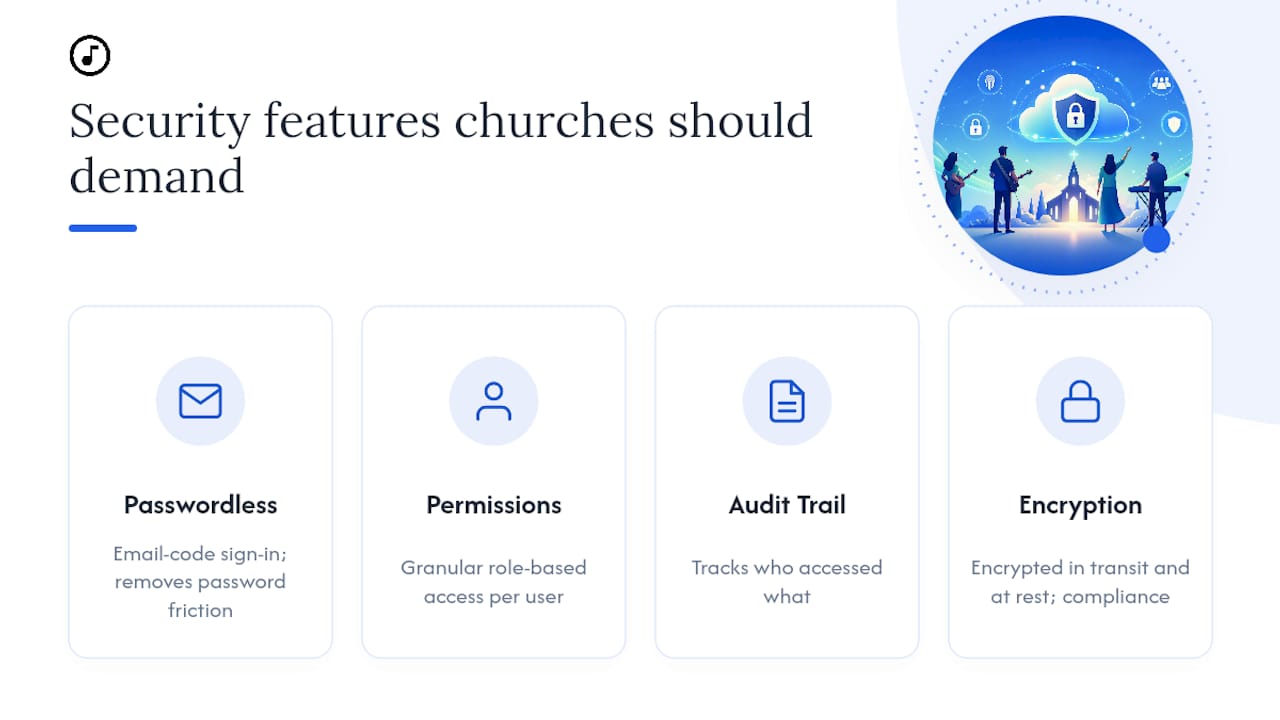
Look for passwordless or simplified sign-in, since forcing volunteers to manage another password is how shared logins and security shortcuts happen. ChurchCloud's approach of email-code sign-in paired with an audit trail is a useful benchmark: it removes password friction while still tracking who accessed what.
Role-based permissions matter just as much. A guest musician filling in for one Sunday shouldn't have the same access as your worship pastor. Ask any vendor how granular their permission settings actually are, not just whether permissions exist.
Finally, ask about compliance standards relevant to your region, and confirm data is encrypted both in transit and at rest. A platform that stores your congregation's information should be able to answer these questions plainly, without hedging.
Does Song7 Work With Your Church Management Software?
Most churches already run a church management system (ChMS) for giving, attendance, and member records. A worship planning platform doesn't need to replace that system, it needs to coexist with it without creating duplicate data entry.
The practical question to ask any vendor is narrower than "do you integrate": ask specifically whether volunteer contact info, service schedules, or team rosters can sync or at least export cleanly between systems. Even without a deep integration, a tool that lets you export setlists and rosters in common formats avoids the trap of re-entering the same names and roles in two places every month.
Song7 keeps its focus tight, on the music ministry side of church operations, so it works alongside whatever ChMS your church already runs rather than competing with it. That's a deliberate trade-off: depth in worship planning instead of trying to be an all-in-one system that does everything adequately and nothing well.
What Training and Support Should Volunteers Expect?
The best cloud tool in the world fails if your volunteers can't figure out how to use it by their second Sunday. Training resources separate platforms that respect volunteer time from ones that assume everyone has an afternoon free to watch tutorials.
Look for short-form training, not lengthy manuals. A 15 to 30 minute walkthrough plus a one-page quick reference sheet should cover the core workflow: viewing a setlist, checking a chord chart, transposing on the spot. If a platform's onboarding requires more than that, it's a signal the interface may be more complex than a volunteer team needs.
In-app guidance matters too. Tooltips, a searchable help center, and responsive email or chat support fill the gap when your one tech-savvy volunteer is out of town. Ask vendors directly what their average support response time looks like, since a three-day wait doesn't help on a Saturday night.
Song7's emphasis on simplicity is designed to reduce how much training is needed in the first place. Fewer buttons and a familiar drag-and-drop interface mean less time explaining the software and more time actually rehearsing.
Can These Tools Support Remote or Hybrid Worship Services?
Remote and hybrid worship stopped being a pandemic-era workaround and became a permanent part of how many churches operate. That shift changes what "collaboration" needs to mean.
A worship leader planning a service where half the team is in the building and a livestream tech is working from home needs everyone looking at the identical, current setlist, not a version emailed out an hour before service. Real-time sync across devices, the same feature that helps a volunteer team in one room, becomes essential when your team is split across locations.

Cloud-stored service plans that update instantly for anyone with access, whether they're on a phone or a desktop, let a remote vocalist confirm their key changes without a phone call. Presentation sync also needs to extend to streaming output, not just the in-room projector, so remote viewers see the same lyrics as the congregation.
The practical test during a trial: have one team member join "remotely" from another room or building and confirm they see every update in real time. If there's a lag or a manual refresh required, that gap will show up in a live service eventually.
Can Small Churches and Different Denominations Customize These Tools?
A 40-person country church and a 400-person urban congregation don't need the same setup, and neither should be forced into it. The flexibility that matters most is in how roles, song libraries, and workflows can be scaled up or down.
Smaller volunteer teams typically need fewer roles (a leader and two or three musicians) and benefit most from simplicity over configurability. Larger churches with multiple services or campuses need more granular permissions, separate setlists per service time, and the ability to manage a bigger song library without it becoming unwieldy.
Denominational differences matter too. A liturgical church running the same hymns and responses weekly has different setlist needs than a nondenominational church rotating through a large contemporary catalog. Look for platforms that let you tag, organize, and filter songs by theme, season, or type, rather than forcing every church into one rigid structure.
The right platform flexes with your church's size and tradition instead of asking your church to flex around the software.
Editorial Perspective: What Volunteer Teams Actually Need to Succeed
Most rollout advice overcomplicates this. Volunteers don't need more features, they need fewer decisions. The churches that succeed with cloud collaboration pick the simplest tool that meets their checklist and set one modest goal for month one: reduce planning time, not transform the entire ministry.
Track one number, minutes spent building a setlist, and let that be the whole scoreboard. Everything else follows from there.
Ready to Try Song7 for Your Worship Team?
Song7 matches the checklist this article just walked through: real-time sync, drag-and-drop setlists, on-the-fly transposition, and a presentation mode built for volunteers instead of IT departments.

A free trial lets you test the parts that matter most before committing anything. Import next Sunday's songs, build the setlist by dragging instead of retyping, transpose a chart mid-rehearsal, and run presentation mode through a real projector. That's the whole evaluation, done in one sitting instead of over weeks.
Onboarding is built to be quick, so your team isn't stuck watching tutorials instead of rehearsing. Support resources are there if a volunteer gets stuck on their first login. Visit the Song7 setlist builder to start a free trial and import your first setlist today.
Sources
- ChurchCloud — Secure File Sharing for Your Congregation
FAQ
What Is Church Cloud Collaboration?
Church cloud collaboration refers to using internet-based software so worship teams can build setlists, share chord charts, and update songs in real time from any device, replacing printed binders and scattered text threads.
How Long Does It Take to Set Up a Worship Planning Platform?
A focused pilot, importing 5 to 8 songs for one service and running a single rehearsal, typically takes under a week, with full team rollout following one or two additional rehearsals.
Does Song7 Work Offline?
Song7 is built for reliable real-time sync across devices, and worship leaders should confirm offline behavior directly during a trial by testing setlist access without an internet connection.
Can Volunteers With No Technical Background Use These Tools?
Yes. Platforms like Song7 emphasize drag-and-drop setlist building and simple sign-in specifically so volunteer teams can use the tool without training beyond a short walkthrough.
Do These Platforms Integrate With Church Management Software?
Most worship planning platforms focus on music ministry rather than full ChMS integration, so churches should confirm whether rosters or schedules can export cleanly to avoid duplicate data entry.