
If your worship team is drowning in tabs, notification pings, and modules you never use, Song7 is the alternative built for exactly that pain, centered on setlists, transposition, and real-time team sync instead of full nonprofit administration. That said, Planning Center alternatives fall into a few distinct categories: all-in-one church management software, worship-and-productivity tools, check-in-focused platforms, and giving-first or free/open-source options. Which one fits depends on whether your bottleneck is music ministry, kids' check-in, or finance reporting.
TL;DR:
- Planning Center can be expensive due to its modular pricing, especially when adding features like giving, check-in, and communication for small to midsize churches.
- Alternatives like ChurchTrac offer a single, flat-rate database, making budgeting simpler and potentially more cost-effective for organizations with limited needs.
- Worship-specific tools such as Song7 focus on streamlining setlists, chord charts, and real-time transposition, reducing coordination lag during rehearsals and services.
- Migrating off Planning Center involves exporting data such as people, teams, services, and songs in a specific order, taking roughly two to three hours for small churches.
- Choosing the right platform depends on whether the primary bottleneck is music planning, children's check-in, or financial reporting, with workflow fit often outweighing feature breadth.
Table of Contents
- Planning Center Alternatives by Category: Which One Matches Your Bottleneck
- How Do You Evaluate Planning Center Alternatives?
- Migrating Off Planning Center: A Step-by-Step Checklist
- What Worship-Specific Features Actually Solve for Volunteers
- Should Your Church Switch or Stick With Planning Center?
- Try Song7 for Your Worship Team's Next Rehearsal
- Sources
- FAQ
Planning Center Alternatives by Category: Which One Matches Your Bottleneck
Not every church struggling with Planning Center has the same problem. Some are drowning in modules they never use. Others just need volunteers to stop texting each other about who's playing keys on Sunday. Sorting alternatives by category, rather than by brand name, gets you to the right answer faster.
Worship and productivity tools exist for one job: getting a band or choir ready for Sunday without friction. WorshipTools is the name that comes up most often here, and comparisons consistently frame it as productivity-shaped, built around setlists, presentation, and rehearsal, rather than the broader nonprofit-tools workflow Planning Center was designed around. Song7 sits in this same category, with a sharper focus on song libraries, chord charts, and instant transposition for volunteer teams specifically.
All-in-one church management software (ChMS) trades specialization for a single database. ChurchTrac is the clearest example, and its own comparisons argue that Planning Center's modular pricing can end up costing multiple times more for a comparable feature set once you add giving, check-in, and communication add-ons separately. Roundups covering the broader landscape also name Subsplash, One Church Software, Gracely, ChMeetings, and Breeze as options in this bracket, each bundling people management, events, and communication under one login.
Check-in-focused platforms solve a narrower, higher-stakes problem: knowing exactly which adult picked up which child, fast, on a busy Sunday. Churches that only need this piece often skip full ChMS platforms entirely in favor of lighter, purpose-built check-in tools that set up faster and price more predictably.
Giving-first and free or open-source tools serve churches where the real pressure point is financial transparency and donor reporting, not scheduling or music. These trade feature depth for lower cost, and some are genuinely free for small congregations, though you'll usually give up polish and support responsiveness in return.
Here's how those four categories break down by who they actually serve:
- Worship/productivity tools (Song7, WorshipTools): best for volunteer-led worship teams whose main pain is setlists, chord charts, and rehearsal coordination.
- All-in-one ChMS (ChurchTrac, Subsplash, Breeze): best for small-to-midsize churches that want one login for people, events, and communication.
- Check-in-focused platforms (KidCheck and similar tools): best for children's ministries where safety and speed at the door matter more than anything else.
- Giving-first/free platforms: best for finance-driven organizations or very small churches prioritizing budget over feature breadth.
The trade-off underneath all four categories is the same: a single unified database reduces double-entry but forces compromises in any one area, while best-of-breed tools (a dedicated worship app plus a separate ChMS) deliver sharper features but add an integration burden someone has to manage. If that someone is a volunteer, that burden matters more than the feature list.
How Do You Evaluate Planning Center Alternatives?
Demos are where vendors put their best foot forward, so you need a framework that cuts through the polish. Six criteria matter more than the rest: database structure, volunteer usability, pricing model, support quality, rehearsal and presentation features, and import/export capability.
Database structure determines whether your people, teams, and songs live in one place or three. Ask a vendor directly whether adding a new volunteer to a Sunday roster automatically updates their profile everywhere else, or whether someone has to enter it twice. A good answer names the specific sync behavior; a vague "it's all connected" answer is a warning sign.
Volunteer usability is the single most underrated criterion for small churches. A platform your worship pastor loves is worthless if your 62-year-old keyboard player can't find the setlist without a phone call. Ask to see the mobile experience during the demo, not just the desktop dashboard.
Pricing model deserves real scrutiny because Planning Center's modular structure is often what pushed you to look elsewhere in the first place. Flat-rate tools like ChurchTrac position themselves against exactly this pain, advertising one price instead of stacked module fees. Ask for the total monthly cost at your actual team size, not the entry-tier number on the pricing page.
Support and onboarding quality varies wildly between vendors serving thousands of churches and vendors serving a few hundred. Ask how a volunteer, not a paid staff member, gets help at 9 p.m. on a Saturday when the chord chart won't transpose correctly.
Rehearsal and presentation features are non-negotiable if music is your bottleneck. Ask whether transposition updates instantly across every team member's screen or requires a manual refresh, and whether presentation mode syncs with the setlist in real time.
Import/export capability protects you from getting locked in twice. Ask exactly what format song libraries, rosters, and service history export in, and request a sample export before you commit to anything.
Here's a simple sequence for weighing these in a demo:
- Confirm the database structure question first, before anything else, since it affects every other feature.
- Test volunteer usability yourself, on a phone, not just from a staff login.
- Get the real monthly total in writing for your team size.
- Ask the support question directly and note the response time promised.
- Request a sample data export before signing anything.
Weight these differently depending on who runs your church day to day. Volunteer-led teams should weigh usability and support above everything else. Admin-led churches with paid staff can tolerate more complexity in exchange for reporting depth.
Pro Tip: Ask every vendor the same exact question, word for word, and compare answers side by side afterward. Demos have a way of blurring together, and a written comparison keeps you honest about what each one actually promised.
Red flags worth walking away from: a sales rep who can't answer the export question directly, a pricing page that requires a call to reveal costs, or a mobile app with a noticeably worse review rating than the desktop version.
Migrating Off Planning Center: A Step-by-Step Checklist
Switching platforms sounds riskier than it usually is, provided you migrate data in the right order. The sequence matters because people records and canonical IDs anchor everything else. Move those first, then service templates and roster schedules, then song libraries with attachments, and reconcile giving data last, in coordination with whoever handles your finances.
Here's what to export before you touch anything else:
- People records, exported as CSV with a unique ID column preserved, so relational links to teams and roles don't break on import.
- Teams and volunteer roles, including position assignments, since these connect people to specific Sunday responsibilities.
- Scheduled services, covering upcoming and recent service plans, to preserve your rehearsal history and roster patterns.
- Song library and attachments, including chord charts, lyric sheets, and any PDF or ChordPro files linked to each song.
- Giving records, exported separately and reconciled against your accounting system rather than imported directly into a new platform's giving module.
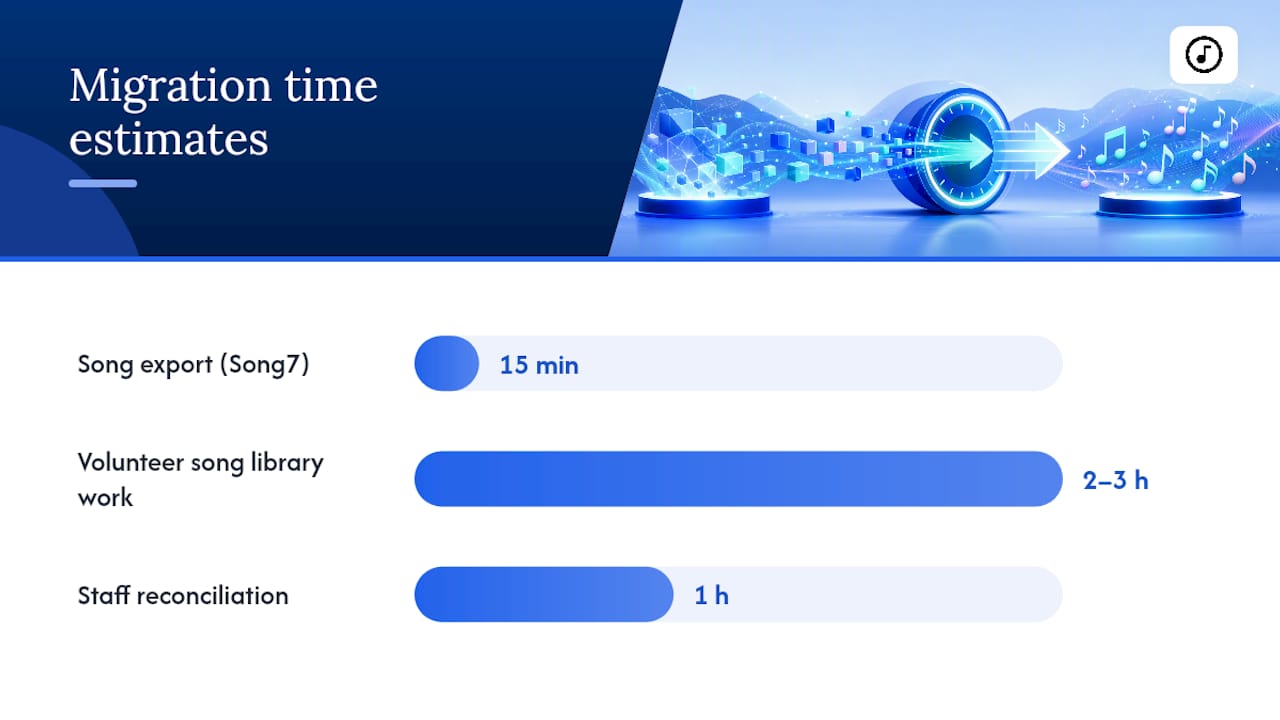
Run a pilot with one team, usually the worship team, before migrating the whole church. Song7 documents a practical export workflow that moves song data out of Planning Center in about 15 minutes, which makes the worship team a low-risk starting point for a pilot migration.
Common mapping issues show up in the CSV column headers: date formats, custom field names, and attachment links often need manual review after import, not before. Budget roughly two to three hours of volunteer time for a small church's song library migration, plus a separate hour for a staff member or bookkeeper to reconcile CCLI reporting and giving totals against the old system before you shut it down. Keep Planning Center active in read-only mode for at least one full reporting cycle so nothing falls through the cracks.
What Worship-Specific Features Actually Solve for Volunteers
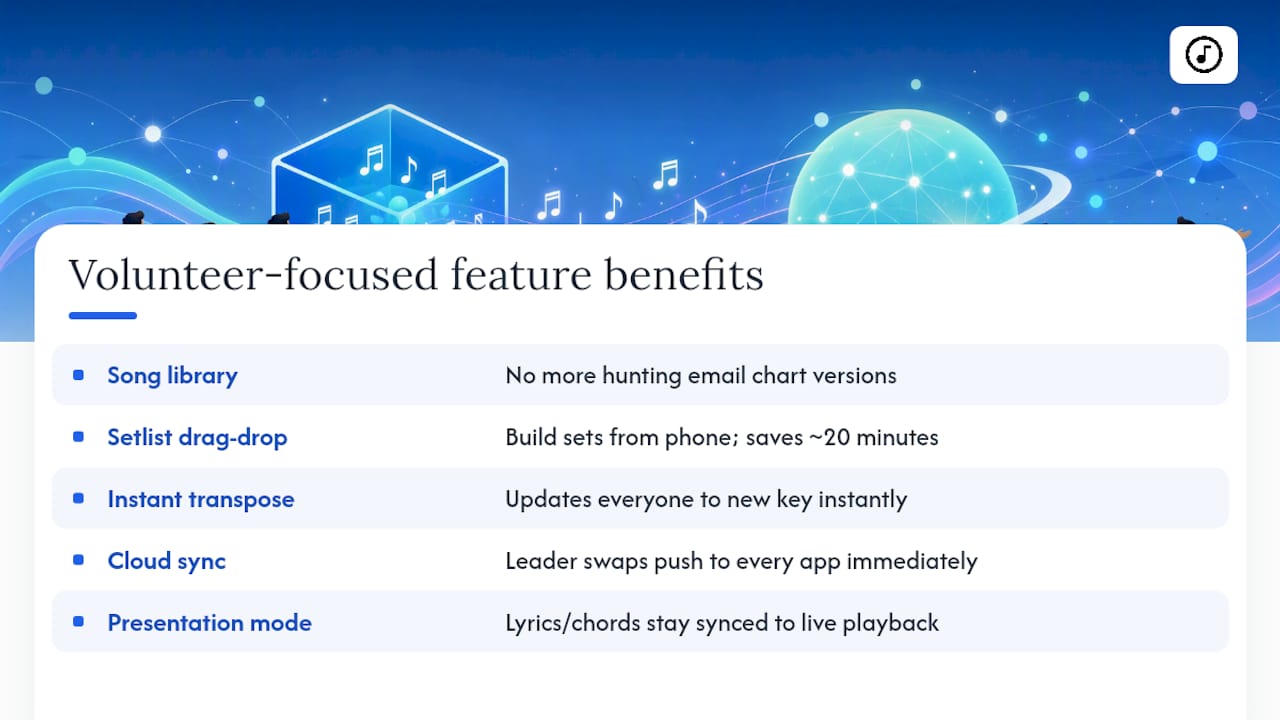
The gap between a general ChMS and a worship-first tool shows up most clearly on a Thursday night rehearsal, not in a sales demo. A centralized song library means nobody hunts through email threads for the right chord chart version. Drag-and-drop setlist building turns a 20-minute scheduling task into something a volunteer can do from their phone between errands. Instant transposition matters because vocalists change keys more often than anyone plans for, and a tool that updates every team member's screen the moment the leader transposes saves the "wait, what key are we in" moment that derails rehearsals.
Song7's cloud collaboration features extend this further: when a leader swaps a song or adjusts a set order, every team member's app updates without anyone sending a group text.
The recurring volunteer complaint isn't feature gaps, it's coordination lag: someone updates a chart, and three other people show up Sunday morning with the old version.
Presentation mode closes that lag by keeping lyrics and chords synced directly to what's being played, not to whatever was printed the week before. For teams juggling last-minute key changes, a substitute guitarist, or a set order that shifts an hour before service, that sync is the difference between a smooth transition and a visible scramble on stage.
Pro Tip: Run your first rehearsal in a new platform exactly like a normal Sunday, key changes and substitutions included, before trusting it with a live service. That's where usability gaps actually surface.
Should Your Church Switch or Stick With Planning Center?
Planning Center still wins for large, multi-campus churches that need advanced fundraising reporting, complex governance across locations, or deep integration with an existing nonprofit finance stack. If that's your context, the modular pricing is a fair trade for the depth you get.
Switching makes sense when the friction is specifically in worship planning: volunteers burning out on manual syncing, a music team paying for modules they never touch, or hidden pricing surprises stacking up module by module. That's a workflow-fit problem, not a features problem, and no amount of Planning Center training fixes it.
Before deciding, ask yourself three questions: Is the pain concentrated in worship scheduling specifically, or spread across the whole church? Would a pilot with just the worship team resolve it? And is the cost complaint about the total bill, or about paying for modules nobody uses? Your answers point to the right next step, trial, pilot, or full migration, more reliably than any feature checklist.
— Editorial team
Try Song7 for Your Worship Team's Next Rehearsal
This app is designed specifically to address the problem worship teams face when managing chord charts, setlists, and last-minute key changes across scattered tools instead of a single focused app. Where all-in-one ChMS platforms ask you to learn modules for finance and check-in you may never touch, Song7 concentrates entirely on getting your music team rehearsal-ready, with drag-and-drop setlists, instant transposition, presentation mode, and real-time sync across every team member's device.

If your Planning Center frustration lives specifically in music ministry, that's the exact gap Song7 fills. Start with a free trial, follow the documented song export workflow to move your existing library over in about 15 minutes, or explore the full feature set before your next rehearsal to see how setlist building and transposition work in practice.
Sources
Pricing claims draw on ChurchTrac's comparison page; category framing from TheLeadPastor's roundup and Capterra's alternatives list; migration details from Song7's own export guide.
- Planning Center vs WorshipTools: Which is Better in 2026? | Toolradar
- ChurchTrac VS Planning Center®
- Best Planning Center Alternative for Check-In (2026)
FAQ
Can I Use Planning Center for Free?
Planning Center offers limited free tiers for very small teams on certain modules, but most churches outgrow the free limits quickly once they add volunteers, services, or song libraries beyond a small threshold.
What Are the Top Church Management Software Options?
Commonly cited options across 2026 roundups include Planning Center, ChurchTrac, Subsplash, Breeze, One Church Software, Gracely, ChMeetings, and worship-focused tools like WorshipTools and Song7, each suited to different priorities from finance to music ministry.
What's the Difference Between Pushpay and Planning Center?
Pushpay is primarily a giving and donor-engagement platform, while Planning Center is a broader nonprofit-tools suite covering scheduling, check-in, and services; churches often use one for money and the other for logistics rather than choosing a single replacement for both.
How Does WorshipTools Compare to Planning Center?
WorshipTools is productivity-shaped and worship-focused, built around setlists and presentation, while Planning Center covers a wider set of nonprofit administration tasks; Song7 occupies similar worship-first territory with a sharper focus on song management and volunteer-friendly transposition tools.