
Set up worship team permissions with a role-based, minimum-privilege model: give each volunteer only the access their job requires, nothing more, and start today by auditing who currently holds admin rights and why. If you're managing a worship team inside software like Song7, review your team roles this week rather than "someday." The first real step is a quick audit, and it takes less time than you think.
TL;DR:
- Auditing admin rights and limiting them to essential personnel reduces the risk of accidental or malicious changes to the entire worship team setup.
- Creating and documenting clear roles such as leader, planner, musician, and tech ensures permissions are appropriately scoped to each volunteer's responsibilities.
- Regular permission reviews every quarter and prompt offboarding prevent outdated or unnecessary access from compromising security or causing errors.
- Setting up a simple hierarchy with reusable role templates and using tags for multi-team volunteers streamlines onboarding and ensures permissions stay accurate.
- Assigning the lowest necessary privileges to new volunteers and elevating access only as needed helps maintain security and accountability over time.
Table of Contents
- Your Quick Permissions Checklist for Worship Teams
- How Permissions Actually Work in Worship Software
- Access Level Examples: What Each Role Should Actually Do
- Setting Up Teams, Groups, and Role Assignments Step by Step
- Managing Invites, Pending Members, and Regular Audits
- Best Practices and Policies That Protect Volunteer Teams
- Permissions Best Practices and Security Considerations
- Customizing Permissions for Different Worship Roles
- Common Permissions Mistakes and How to Fix Them
- Why Simple Permissions Protect the Whole Team
- Where to Set Up Roles and Permissions in Song7
- Sources
- FAQ
Your Quick Permissions Checklist for Worship Teams
You don't need a committee meeting to get started. You need twenty minutes and this list.
- Audit admin access first. Pull up every account with full admin rights and ask whether each person still needs it.
- Define three to five core roles (Leader, Planner, Musician, Tech, Volunteer) and write down the minimum privileges each one actually needs.
- Turn on audit logs if your platform offers them, and put a quarterly review date on the calendar right now.
- Document the policy in one place and walk your volunteers through it, even if it's just a shared doc and a five-minute announcement.
That last step matters more than people expect. A permissions policy nobody's read is just a permissions policy that doesn't exist yet.
How Permissions Actually Work in Worship Software
Most worship-team platforms stack permissions in layers, and understanding those layers keeps you from making a change that ripples further than you intended. Account-level permissions govern the whole organization, including billing and top-level settings. Team-level permissions scope access to a specific ministry group, like your Sunday band versus your Wednesday youth team. Service-level permissions control who can touch a specific setlist or rehearsal plan.
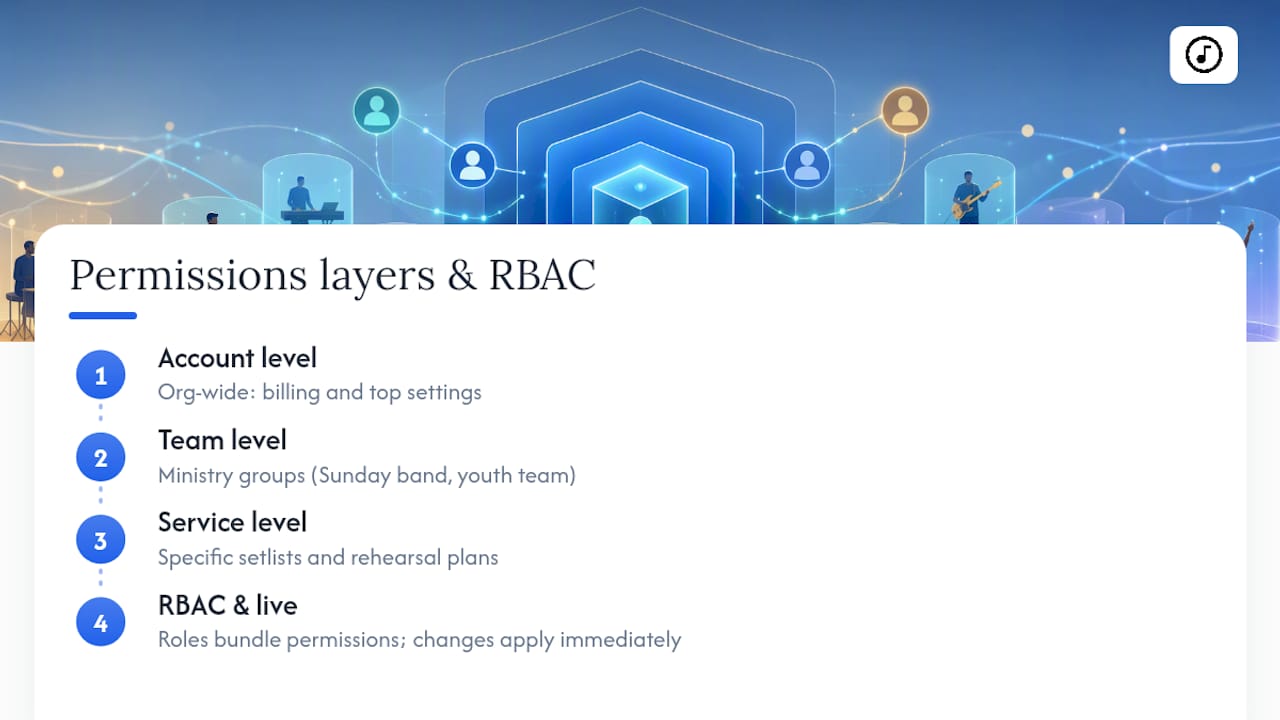
Modern tools increasingly rely on role-based access control (RBAC) instead of simple on/off toggles. RBAC assigns a person to a role, and the role carries a bundle of permissions with it, rather than forcing you to flip fifteen individual switches per volunteer. WorshipTools documents this directly, offering advanced permission levels that let admins restrict which users can access which teams and service types, so a volunteer serving both youth and main worship doesn't accidentally edit the wrong service.
Changes typically propagate in real time. When you adjust someone's role, their access updates immediately across every device they're logged into, without them needing to log out and back in. That immediacy is convenient, but it also means a mistake shows up instantly, which is exactly why scoped permissions matter. Narrow access reduces the blast radius of an accidental edit, a mislabeled chart, or a deleted setlist two hours before rehearsal.
Access Level Examples: What Each Role Should Actually Do
Role names vary by platform, but the underlying responsibilities look similar almost everywhere. Here's a template you can adapt regardless of which software your team uses.
- Leader/Admin: Full account control, including billing, member removal, and permission changes. Keep this role limited to one or two people, because every admin is a potential single point of failure.
- Setlist Planner: Can build and edit setlists, assign songs, and organize service flow, but can't manage team membership or account settings.
- Musician/Vocalist: Views assigned setlists, chord charts, and learning resources, without edit access to anything outside their own part.
- Tech/AV Role: Controls presentation mode, lyric displays, and live-service tools, scoped to the service in progress rather than the whole song library.
- Volunteer/Guest: Minimal, often time-boxed access, limited to the specific rehearsal or service they're scheduled for.
Worship Online's help documentation breaks down a similar structure, offering Leader, Setlist Planner, and Musician/Vocalist access levels as standard tiers, which lines up closely with what most volunteer teams need. The point isn't matching these labels exactly. It's making sure someone who only sings on Sundays can't accidentally delete Wednesday's setlist.
Setting Up Teams, Groups, and Role Assignments Step by Step
Getting the structure right up front saves you from untangling a mess six months later. WorshipTeam's own documentation describes a straightforward account, group, and team hierarchy that works as a solid starting framework for most churches.
- Choose a simple hierarchy. Structure things as account, then teams, then roles within each team, rather than inventing a flatter or more complex system.
- Build reusable role presets. Create your Leader, Planner, Musician, and Tech templates once, then apply them to every new volunteer instead of configuring permissions from scratch each time.
- Handle multi-team volunteers with tags. If someone serves on both the youth band and the main worship team, assign them to both teams and use tags or filters to keep their permissions scoped correctly to each.
- Guard your admin seats. Limit master admin access to the smallest number of people who genuinely need it, and require a second person to know the account recovery process in case the primary admin is unavailable.
Get this sequence right once, and every future volunteer addition takes minutes instead of a fresh round of guesswork.
Managing Invites, Pending Members, and Regular Audits
Most platforms follow a similar invite flow: you send an email or link, the volunteer accepts, and they land in whatever role you've pre-assigned. The friction usually shows up in what happens next.
- Chase unaccepted invites weekly. An invite sitting pending for three weeks usually means the volunteer forgot, not that they declined, so a quick text often resolves it faster than a resend.
- Archive, don't delete, inactive volunteers. Suspending access preserves their history while removing their ability to edit anything, which matters if they return after a season away.
- Run a log check monthly. If your tool offers audit reports, glance at recent permission changes to confirm nothing shifted without your knowledge.
- Run a full quarterly review. Confirm every current role still matches what that person is actually doing on your team today.
That quarterly rhythm is the difference between a policy you set once and a system that stays accurate as your team changes.
Best Practices and Policies That Protect Volunteer Teams
The strongest permissions systems aren't the most restrictive ones. They're the clearest ones, built around a simple idea: nobody gets more access than their current role requires, and access grows only as trust and training do.
Start volunteers at the lowest reasonable access level and stage their onboarding around demonstrated readiness rather than tenure. Tying permission elevation to demonstrated competence rather than an arbitrary waiting period, such as completing an orientation checklist or successfully running a few rehearsals with a mentor, gives volunteers a clear, motivating path forward instead of a vague sense that access is doled out by seniority.
Reformed Worship's coverage of team structures makes a similar point about accountability. Teams function better with documented role definitions and annual reviews than with an informal understanding that "everyone just knows who does what." Write it down. Have new admins sign off on the responsibilities that come with elevated access.
Pro Tip: Keep a single backup admin who isn't your primary worship leader. If your main admin is out sick the morning of a service and a permission needs fixing fast, you want someone else who already knows how.
Permissions Best Practices and Security Considerations
Security in a volunteer environment looks different than in a typical workplace, mostly because your "employees" rotate seasonally and often share devices. A few practices matter more here than the standard corporate playbook suggests.
Default every new account to the lowest privilege tier, then elevate deliberately. This single habit prevents the most common security gap in volunteer teams: someone gets admin access "temporarily" to fix one thing, and nobody remembers to revoke it. Set a calendar reminder the moment you grant a temporary elevation.
Scope access by team and service type wherever your platform allows it. A youth worship volunteer shouldn't have edit rights on your main Sunday setlist just because they're part of the broader church account. Restricting access by team and service type keeps overlapping ministries from stepping on each other's work.
Review shared devices carefully. A tablet used for lyric display on stage may stay logged into an account between services. If that account carries admin privileges, anyone who picks up the tablet inherits them. Assign tech-role access to shared devices instead of a personal admin login.
Finally, treat departing volunteers like departing staff. Revoke access the week they leave, not "whenever someone gets around to it." A stale account with edit rights is a loose end, and loose ends are how permissions systems quietly fail.

Customizing Permissions for Different Worship Roles
A generic permission set fails the moment your team grows past a handful of people, because a bassist and a slide operator need entirely different things from the same software. Customization starts with asking what each role actually touches during a normal week.
A vocalist mostly needs read access: chord charts, lyrics, assigned setlists, and maybe a way to mark songs as learned. They rarely need edit rights on anything. A setlist planner needs the opposite profile: heavy edit access to song order and arrangements, but no reason to touch member management or billing.
Tech and AV volunteers need something narrower still, scoped tightly to whatever's live that specific service. ChurchTrac's documentation shows this pattern clearly, assigning teams and roles access to specific worship outlines, songs, and libraries rather than blanket account access. That scoping keeps a projection volunteer from accidentally opening next month's planning document mid-service.
Guest musicians and fill-in players deserve their own tier entirely: time-boxed access tied to a single service date, revoked automatically or manually once that service ends. If your platform doesn't support automatic expiration, put a manual reminder on your quarterly audit so these accounts don't linger for months.
The underlying principle stays constant across every role: permissions should mirror job function, not seniority or friendship. The drummer who's been with the church twelve years doesn't need admin rights just because he's trusted. He needs whatever the drummer role requires, and nothing else.
Common Permissions Mistakes and How to Fix Them
The same handful of mistakes show up across almost every volunteer worship team, and most are easy to fix once you know what to look for.
Too many admins. Churches often make everyone who's been around a while an admin, out of respect rather than necessity. Fix it by auditing your admin list this month and downgrading anyone who doesn't actively manage the account or team structure.
No offboarding process. A volunteer moves across the country, and their account sits active for a year because nobody remembered to remove it. Build offboarding into your regular volunteer coordination, not just your permissions checklist.
Permissions granted out of convenience, not need. "Just make her an admin so she can fix the typo" is how scope creep happens. Fix the typo yourself, or grant a narrow, temporary permission instead of a blanket one.
No documentation of who has what. When something breaks and three people could have caused it, an undocumented permissions structure turns troubleshooting into guesswork. A simple shared spreadsheet listing roles and access levels solves this in under an hour.
Ignoring pending invites. Unaccepted invites pile up and eventually get forgotten, leaving you unsure who's actually on the team versus who just never responded. Clear these out during your quarterly review, not as an afterthought.
Most permissions problems aren't technical. They're the result of skipping a five-minute review because rehearsal is in twenty minutes and everyone's already stressed.
Why Simple Permissions Protect the Whole Team
Permissions work best when they're invisible, which sounds backward until you've watched a volunteer team try to function under either extreme. Too many restrictions, and your musicians spend rehearsal asking someone else to open a chart for them. Too few, and one well-meaning volunteer accidentally wipes Sunday's setlist an hour before doors open. The goal isn't tight control. It's designing access so nobody has to think about it.
Song7's role-based structure and real-time syncing exist because volunteer coordination breaks down fastest at the seams, not the center. When a setlist updates and every musician's screen reflects it instantly, you've removed one more place where confusion creeps in. But no software replaces the human side of this. Pair whatever role structure you build with actual training, so permissions match not just what someone's allowed to do, but what they're ready to do.
— Editorial team
Where to Set Up Roles and Permissions in Song7
Song7 was built around the same role-based thinking this article recommends: give each volunteer exactly the access their part requires, and let the software handle the rest. Its team roles cover Leader, Planner, and Musician-style access out of the box, so you're not reinventing a permissions structure from scratch, and its real-time syncing means a setlist change or chord update reaches every assigned team member's screen the moment you make it, without a single "did you get the new version?" text.

That syncing pairs with instant song updates, drag-and-drop setlist building, and presentation mode, all scoped to whoever's assigned to a given service. Setting up your first roles takes a few minutes: create your team, invite your volunteers, and assign each one a role template rather than configuring permissions person by person. If your team is still juggling group texts and shared spreadsheets, start a free trial with Song7 and run your next rehearsal with everyone looking at the same setlist, updated in real time.
Sources
- How to Invite and Manage Team Members
- How to Train and Retain Your Worship Tech Volunteers
- Worship teams, committees, and staff positions
FAQ
What roles typically make up a worship team?
Most worship teams include a leader or admin, a setlist planner, musicians and vocalists, a tech or AV volunteer, and occasional guest musicians, each with different levels of software access matched to their responsibilities.
What are the most common worship team problems?
Volunteer burnout, unclear role expectations, and accidental setlist or chart edits from over-broad permissions rank among the most frequent issues worship leaders report, and most trace back to a lack of documented structure.
What guidelines make a worship team run smoothly?
Clear, documented roles, minimum-privilege access by default, regular permission audits, and pairing access changes with training and mentoring consistently produce smoother, lower-friction teams.
Do worship team members get paid?
Most worship team members serve as volunteers, though some churches employ a paid worship leader or music director as staff; payment structures vary widely by church size and denomination, so check your own church's policy rather than assuming a standard.
How do I get the right permissions for my worship team set up quickly?
Start by defining three to five roles with minimum necessary access, then use role presets in a platform like Song7 to apply those permissions consistently instead of configuring each volunteer's access individually.